Platforms_
Register Web, Apple, Android, Windows, and Linux apps to your Appwrite project programmatically using server SDKs.
3 min read
Each Appwrite project has a list of registered platforms. A platform identifies a client application that is allowed to talk to your project's API: a Web platform pins an allowed hostname for CORS, while Apple, Android, Windows, and Linux platforms pin a bundle, package, or application ID for native clients.
Platforms can be added from the Appwrite Console, or programmatically through any server SDK using the Project service.
Manage from the Console
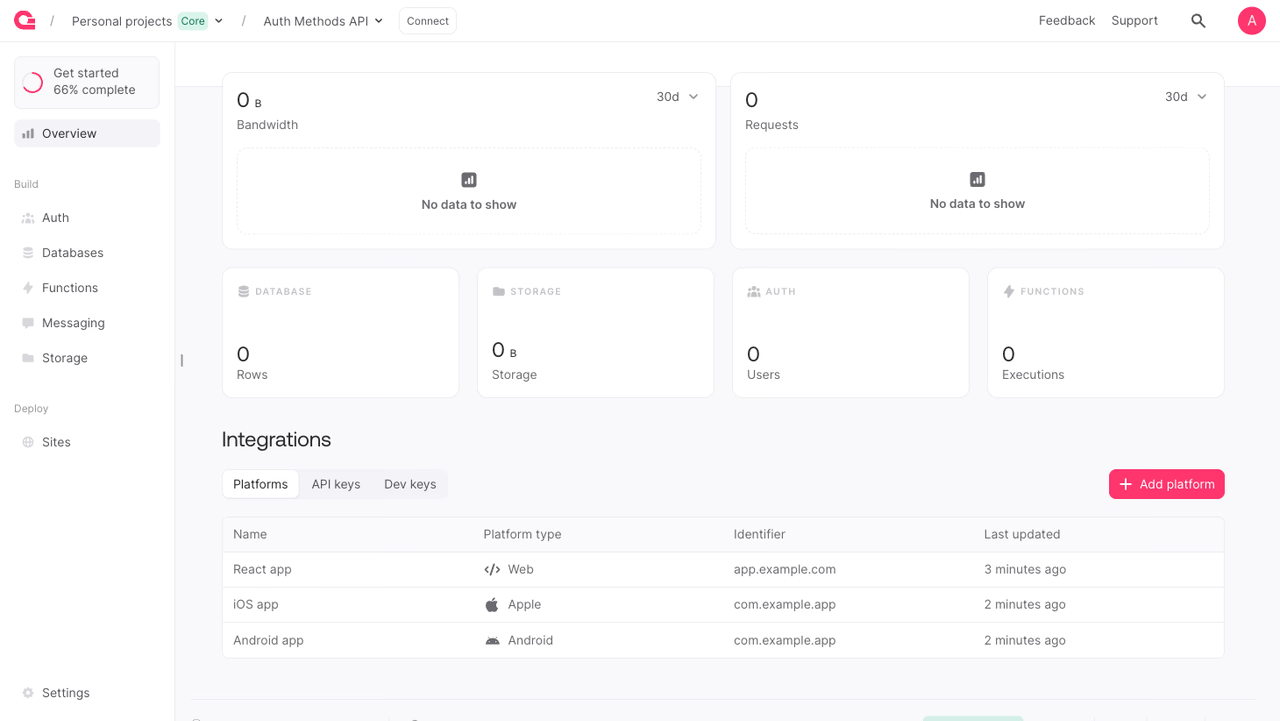
To add a platform manually:
- Open your project in the Appwrite Console.
- On the project Overview, scroll to the Integrations card and select the Platforms tab.
- Click Add platform and choose the platform type (Web, Flutter, Android, Apple, or React Native).
- Fill in the name and the platform's identifier (hostname for Web, bundle or package ID for native), then click Create platform.
- To rename or remove a platform later, click its row and use the edit dialog or the Delete button.
Platform types
The Project service exposes a dedicated create method per platform type. Each method takes a unique platformId, a display name, and the platform's identifier:
| Type | Method | Identifier param |
|---|---|---|
| Web | createWebPlatform | hostname (e.g. app.example.com) |
| Apple | createApplePlatform | bundleIdentifier (e.g. com.example.app) |
| Android | createAndroidPlatform | applicationId (e.g. com.example.app) |
| Windows | createWindowsPlatform | packageIdentifierName |
| Linux | createLinuxPlatform | packageName |
Flutter and React Native platforms shown in the Console map to the underlying Apple, Android, or Web type based on the target you pick.
Register a platform
The example below registers a Web platform. Swap the method name and identifier param to register Apple, Android, Windows, or Linux platforms.
The API key used for these calls needs platforms.write to create, update, or delete platforms, and platforms.read to list or fetch them.
List platforms
Get a platform
Fetch a single platform by its ID. The response includes the platform's type-specific fields, such as hostname for Web or bundleIdentifier for Apple.
Update a platform
Each platform type has a matching update method (updateWebPlatform, updateApplePlatform, and so on). The example below updates a Web platform's name and hostname.
Delete a platform
Benefits
- Repeatable provisioning. Script the full set of platforms a project needs and recreate it on demand, without clicking through the Console.
- Environment parity. Keep dev, staging, and production projects in sync by running the same script against each one.
- CI and automation. Add or rotate platforms from a CI job when a new preview environment spins up or a domain changes.
Was this page helpful?
Share what worked or what we should fix. Once approved, our agents automatically apply suggested updates to the docs.