OAuth providers_
Configure OAuth2 sign-in providers for your project from the Console or programmatically with a Server SDK.
4 min read
OAuth2 providers let your users sign in with accounts they already have, such as GitHub, Google, or Apple. Each provider stores a client ID and client secret at the project level, and can be enabled or disabled independently.
You can configure providers from the Appwrite Console or programmatically with a Server SDK. Each provider has its own update method (updateOAuth2GitHub, updateOAuth2Google, and so on), the read methods listOAuth2Providers and getOAuth2Provider cover all of them.
Configure from the Console
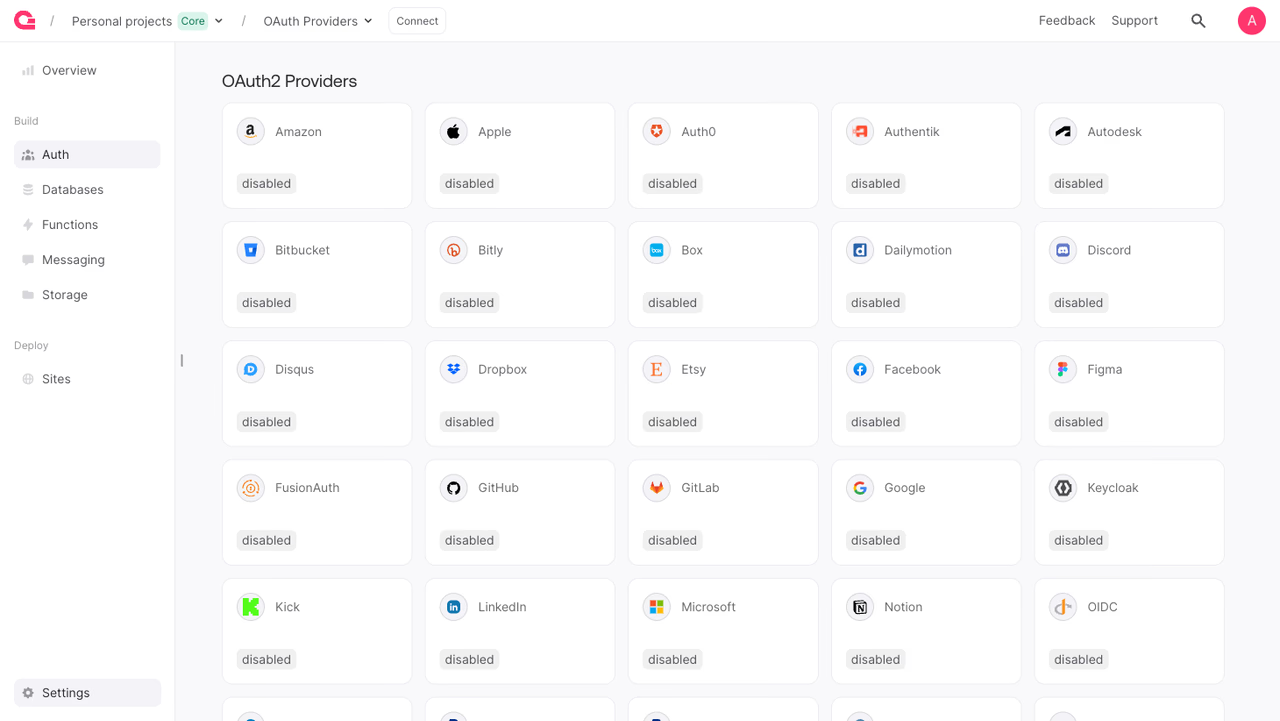
To configure a provider from the Console:
- Open your project in the Appwrite Console.
- Navigate to Auth in the sidebar, then open the Settings tab.
- Find the provider in the OAuth2 Providers list and click it.
- Enter the credentials from the provider (the field names vary per provider, see Available providers).
- Toggle the provider on and click Update.
Configure a provider
Each provider has a dedicated update method named updateOAuth2<Provider>. The example below configures GitHub. Swap the method name and credential fields to configure a different provider, the field names per provider are listed in Available providers.
The API key used for these calls needs oauth2.write to configure providers, and oauth2.read to list or fetch them.
Setting enabled to true triggers end-to-end validation of the credentials against the provider, and the request throws if they are invalid. To store credentials without activating the provider yet, send them with enabled set to false.
Providers with extra fields
Some providers take more than a client ID and secret. Google, for example, accepts an additional prompt parameter that controls the consent screen behavior:
Available providers
Every provider has its own updateOAuth2<Provider> method. The credential field names differ per provider, use the columns below to map the provider's credentials to the method's parameters.
| Provider | SDK method | App ID field | App secret field | Other fields |
|---|---|---|---|---|
| Amazon | updateOAuth2Amazon | clientId | clientSecret | |
| Apple | updateOAuth2Apple | serviceId | keyId | teamId |
| Auth0 | updateOAuth2Auth0 | clientId | clientSecret | endpoint |
| Authentik | updateOAuth2Authentik | clientId | clientSecret | endpoint |
| Autodesk | updateOAuth2Autodesk | clientId | clientSecret | |
| Bitbucket | updateOAuth2Bitbucket | key | secret | |
| Bitly | updateOAuth2Bitly | clientId | clientSecret | |
| Box | updateOAuth2Box | clientId | clientSecret | |
| Dailymotion | updateOAuth2Dailymotion | apiKey | apiSecret | |
| Discord | updateOAuth2Discord | clientId | clientSecret | |
| Disqus | updateOAuth2Disqus | publicKey | secretKey | |
| Dropbox | updateOAuth2Dropbox | appKey | appSecret | |
| Etsy | updateOAuth2Etsy | keyString | sharedSecret | |
updateOAuth2Facebook | appId | appSecret | ||
| Figma | updateOAuth2Figma | clientId | clientSecret | |
| FusionAuth | updateOAuth2FusionAuth | clientId | clientSecret | endpoint |
| GitHub | updateOAuth2GitHub | clientId | clientSecret | |
| GitLab | updateOAuth2Gitlab | applicationId | secret | endpoint |
updateOAuth2Google | clientId | clientSecret | prompt | |
| Keycloak | updateOAuth2Keycloak | clientId | clientSecret | endpoint, realmName |
| Kick | updateOAuth2Kick | clientId | clientSecret | |
updateOAuth2Linkedin | clientId | primaryClientSecret | ||
| Microsoft | updateOAuth2Microsoft | applicationId | applicationSecret | tenant |
| Notion | updateOAuth2Notion | oauthClientId | oauthClientSecret | |
| OIDC | updateOAuth2Oidc | clientId | clientSecret | wellKnownURL, authorizationURL, tokenURL, userInfoURL |
| Okta | updateOAuth2Okta | clientId | clientSecret | domain, authorizationServerId |
| PayPal | updateOAuth2Paypal | clientId | secretKey | |
| PayPal Sandbox | updateOAuth2PaypalSandbox | clientId | secretKey | |
| Podio | updateOAuth2Podio | clientId | clientSecret | |
| Salesforce | updateOAuth2Salesforce | customerKey | customerSecret | |
| Slack | updateOAuth2Slack | clientId | clientSecret | |
| Spotify | updateOAuth2Spotify | clientId | clientSecret | |
| Stripe | updateOAuth2Stripe | clientId | apiSecretKey | |
| Tradeshift | updateOAuth2Tradeshift | enabled only | ||
| Tradeshift Sandbox | updateOAuth2TradeshiftSandbox | enabled only | ||
| Twitch | updateOAuth2Twitch | clientId | clientSecret | |
| WordPress | updateOAuth2WordPress | clientId | clientSecret | |
| X | updateOAuth2X | customerKey | secretKey | |
| Yahoo | updateOAuth2Yahoo | clientId | clientSecret | |
| Yandex | updateOAuth2Yandex | clientId | clientSecret | |
| Zoho | updateOAuth2Zoho | clientId | clientSecret | |
| Zoom | updateOAuth2Zoom | clientId | clientSecret |
The Apple provider is currently in beta.
List providers
List every OAuth2 provider and its current configuration state.
Get a provider
Fetch a single provider's configuration by its provider ID.
Benefits
- Repeatable provisioning. Script the full set of OAuth2 providers a project needs and recreate it on demand, without clicking through the Console.
- Environment parity. Keep dev, staging, and production projects in sync by running the same configuration script against each one.
- Server-only secrets. Client secrets are write-only over the API and never returned in responses, so configuration scripts can run in CI without exposing them.
Was this page helpful?
Share what worked or what we should fix. Once approved, our agents automatically apply suggested updates to the docs.