Mock phones_
Register fictional phone numbers and OTPs to test phone authentication flows without sending real SMS messages.
2 min read
Mock phones let you register fictional phone numbers and a fixed verification code at the project level. When a tester signs in with a registered number, the registered code works in place of a real SMS, so phone authentication flows can be exercised in CI, demo accounts, and app store review submissions without sending SMS or paying provider fees.
Each project stores its mock phones on the project document. Numbers must be in E.164 format, and verification codes are exactly six digits.
Add from the Console
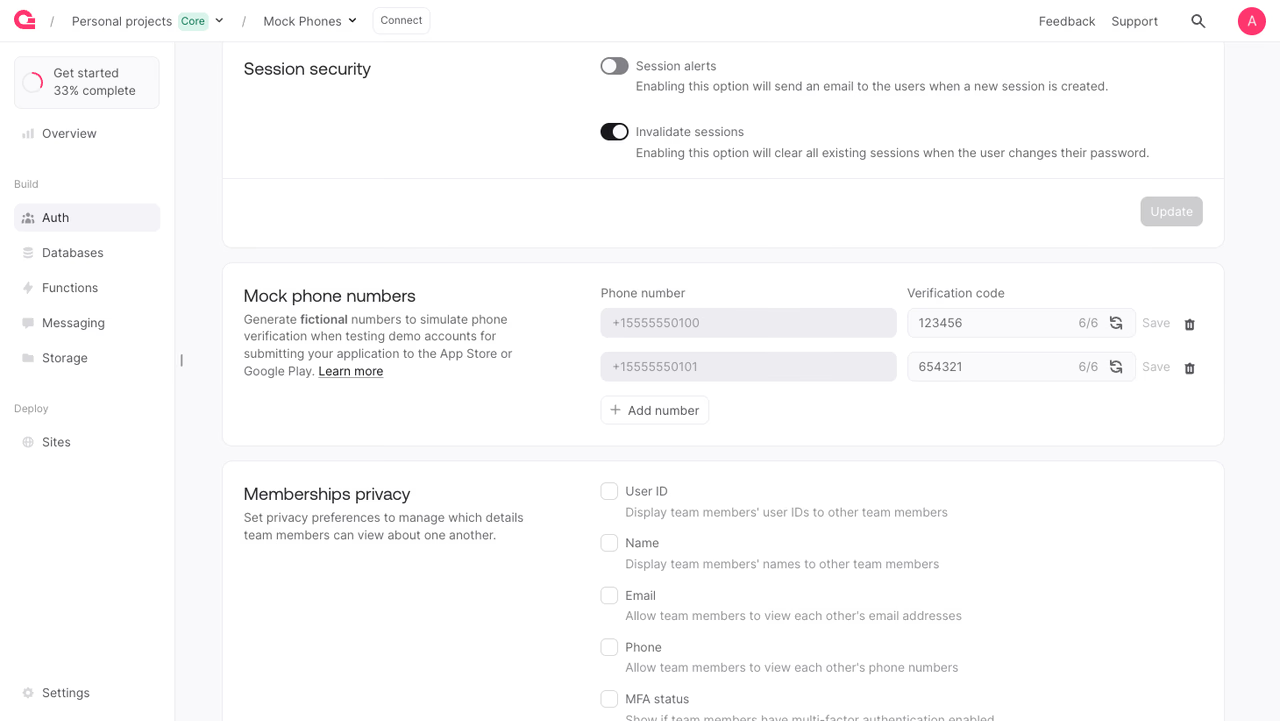
To add a mock phone manually:
- Open your project in the Appwrite Console.
- Navigate to Auth in the sidebar, then open the Settings tab.
- Scroll to the Mock phone numbers card and click Add a number.
- Enter a phone number in E.164 format (for example,
+15555550100) and a six-digit verification code. - Click Save on the row, then Update at the bottom of the section to persist.
Use fictional ranges (such as North American 555 numbers) to avoid collision with real subscribers.
Manage with a Server SDK
The Project service exposes endpoints to list, create, get, update, and delete mock phones. All endpoints require an API key with the appropriate scope or a Console session.
Reading mock phones requires the mocks.read scope. Creating, updating, or deleting requires mocks.write.
Create a mock phone
The endpoint returns the new MockNumber document.
List mock phones
Get a mock phone
Update a mock phone
Delete a mock phone
Benefits
- No SMS costs in test flows. Exercise phone authentication in CI, demo accounts, and app store review submissions without sending real SMS or paying provider fees.
- Stable credentials for automation. Registered numbers and codes don't expire or rotate, so end-to-end tests stay deterministic across runs.
- Repeatable provisioning. Script the mock phone set a project should expose and apply it from CI when spinning up a new environment.
Was this page helpful?
Share what worked or what we should fix. Once approved, our agents automatically apply suggested updates to the docs.