Tokens_
Access, refresh, and ID tokens issued by Appwrite's OAuth2 server, their lifetimes, and how to validate, refresh, introspect, revoke, and end sessions.
6 min read
When a client redeems an authorization code, the OAuth2 server issues an access token and refresh token. It also issues an ID token when the openid scope was granted. This page covers what each token does and how clients and resource servers validate, refresh, introspect, revoke, and end sessions.
The three tokens
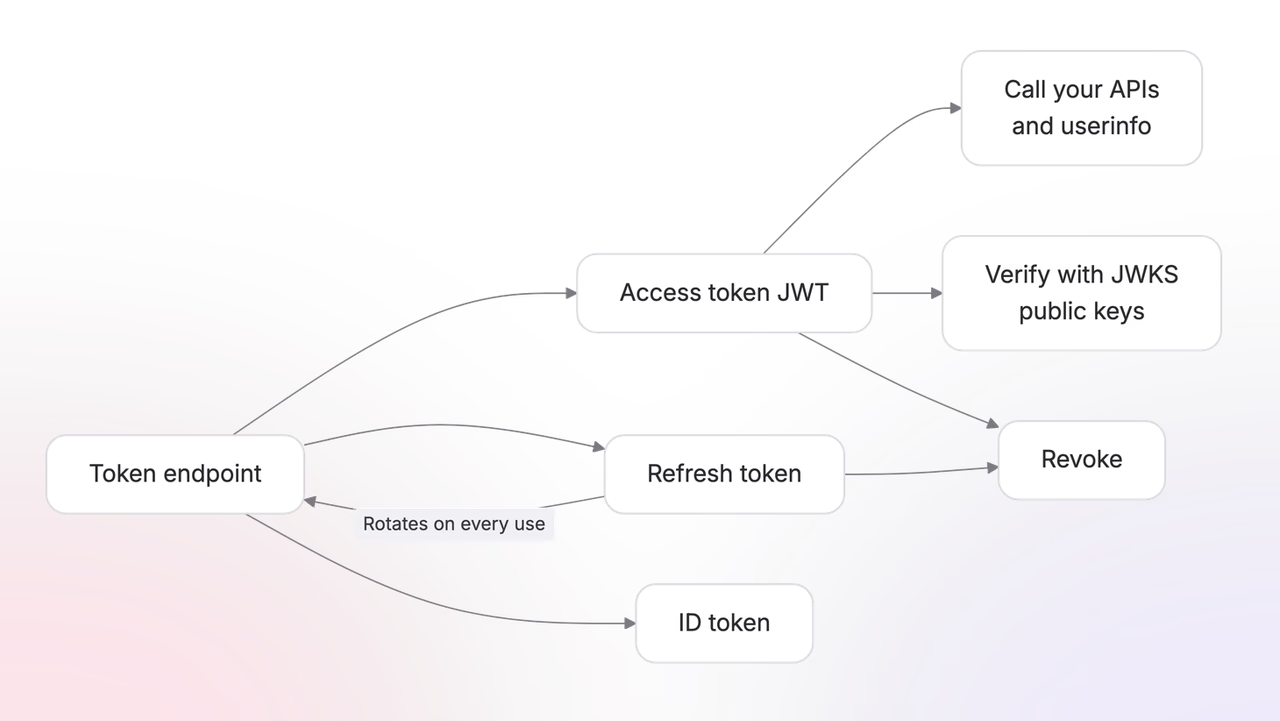
- Access token. A signed JWT that a client presents to a resource server when it calls an API on the user's behalf. It contains the authorization information the resource server needs to evaluate the request. The claims are explained in Validate tokens.
- Refresh token. A value the client exchanges for a new access token when the current one expires, without sending the user through authorization again. Treat it as an opaque secret even though Appwrite currently encodes it as a JWT.
- ID token. A signed JWT from OpenID Connect that tells the client who authenticated. It is returned when the
openidscope is granted and can include profile, email, or phone claims when those scopes were approved. A public client can use these verified claims to show the user's name or decide that its sign-in UI needs attention before calling an API. Resource servers authorize requests with the access token, not the ID token.
Exchange a code for tokens
The client exchanges its authorization code at the token endpoint with grantType: 'authorization_code'. A confidential client sends its clientSecret; a public client sends its codeVerifier instead.
The response includes the access token, refresh token, granted scopes, token type, and access-token lifetime. It includes an ID token when the openid scope was granted. authorization_details contains the approved rich authorization data when the request used it.
{ "access_token": "eyJ...", "token_type": "Bearer", "expires_in": 3600, "refresh_token": "eyJ...", "scope": "openid profile email", "authorization_details": null, "id_token": "eyJ..."}Token lifetimes
Lifetimes default by client type and are configurable per project on the OAuth2 server settings.
| Confidential | Public | |
|---|---|---|
| Access token | 8 hours | 1 hour |
| Refresh token | 365 days | 30 days |
Public clients get shorter lifetimes because their tokens live on user devices, where the risk of theft is higher, so the window of exposure is kept small.
Refresh with rotation
To refresh, the client sends its current refresh token to the token endpoint. A successful response contains a new access token and a new refresh token.
Each successful refresh replaces the stored refresh token. The client must store the newest refresh token before making another request. If the client presents an older refresh token again, Appwrite treats it as reuse and deletes the OAuth identity for that client and user. The current access token and newest refresh token then stop working, and the user must authorize that client again. Tokens issued to other clients are not affected.
This public-client example sends JSON. A confidential client also includes its client_secret.
The response has the same shape as the original token response, with new values for access_token, refresh_token, and expires_in.
Validate tokens
Access and ID tokens are RS256 JWTs signed with your project's key. A JWT contains a header, payload, and signature. The payload is readable, but its claims are trustworthy only after the client or resource server verifies the signature, issuer, audience, and expiry.
The server publishes its public keys as a JWKS document:
https://<REGION>.cloud.appwrite.io/v1/oauth2/<PROJECT_ID>/.well-known/jwks.jsonA web client can use the jose package to read the discovery document, select the correct public key from the JWKS response, and verify both tokens:
import { createRemoteJWKSet, jwtVerify } from 'jose';
const accessToken = '<ACCESS_TOKEN>';const idToken = '<ID_TOKEN>';const clientId = '<CLIENT_ID>';
const discoveryUrl =    'https://<REGION>.cloud.appwrite.io/v1/oauth2/<PROJECT_ID>/.well-known/openid-configuration';const metadata = await fetch(discoveryUrl).then((response) => response.json());const jwks = createRemoteJWKSet(new URL(metadata.jwks_uri));const projectAudience = metadata.issuer.replace('/oauth2/', '/');
const { payload: accessClaims } = await jwtVerify(accessToken, jwks, {    issuer: metadata.issuer,    audience: projectAudience});
const { payload: idClaims } = await jwtVerify(idToken, jwks, {    issuer: metadata.issuer,    audience: clientId});
A verified access-token payload contains the authorization context for API calls:
{ "iss": "<ISSUER>", "sub": "<USER_ID>", "aud": ["<PROJECT_API_AUDIENCE>"], "client_id": "<CLIENT_ID>", "scope": "openid profile email calendar.read", "auth_time": 1784052423, "iat": 1784052858, "exp": 1784056458, "jti": "<TOKEN_JTI>", "tokenId": "<TOKEN_ID>"}A verified ID-token payload identifies the signed-in user. Profile claims appear only when their matching scopes were granted:
{ "iss": "<ISSUER>", "sub": "<USER_ID>", "aud": "<CLIENT_ID>", "name": "Ada Lovelace", "email": "ada@example.com", "email_verified": true, "auth_time": 1784052423, "iat": 1784052858, "exp": 1784056458, "at_hash": "<ACCESS_TOKEN_HASH>"}A client may decode a token without verification to make a temporary UI choice, such as showing a sign-in screen before an API request. Only verified claims should control access or display trusted identity information.
To retrieve the current user's profile with an access token, call the userinfo endpoint:
Introspect a token
An OAuth access token is not an Appwrite session or API key, so it does not authorize general Appwrite SDK methods. Appwrite's OAuth endpoints consume tokens only where the OAuth flow defines them. For example, userinfo accepts an access token as a bearer credential, while the token, introspection, and revocation endpoints accept their respective tokens as request parameters.
To make an access token useful to your product:
- Add custom scopes in Auth > OAuth2 server > Settings that describe the operations your API exposes.
- Host an API that acts as the resource server. Appwrite Functions and server-rendered Appwrite Sites are suitable places to run it.
- Read the bearer access token from each incoming request.
- From your server, call the introspection endpoint with an Appwrite API key that has the
oauth2.readscope. Keep this API key on the server. - Require
active: true, then check thatscopecontains every permission the API operation needs. - Perform the operation only after those checks pass.
Introspection verifies the token against the current OAuth identity, so it detects expiry, revocation, refresh rotation, and refresh-token reuse. This is different from offline JWT verification, which cannot detect a token that was revoked before its exp time.
The resource server sends JSON:
An active access token returns its client, user, audience, expiry, and granted scopes:
{ "active": true, "scope": "calendar.read calendar.write", "client_id": "<CLIENT_ID>", "token_type": "Bearer", "sub": "<USER_ID>", "aud": ["<PROJECT_API_AUDIENCE>"], "iss": "<ISSUER>", "exp": 1784056458, "iat": 1784052858, "jti": "<TOKEN_JTI>", "token_use": "access_token"}An expired, revoked, malformed, or otherwise inactive token returns:
{ "active": false}A confidential OAuth client can also authenticate with its client ID and client secret to introspect one of its own tokens. Public clients must not receive a project API key or client secret.
Revoke a token
A third-party client should revoke its token when the user disconnects the integration or the client no longer needs access. Revoking either the current access token or refresh token deletes the OAuth identity for that client and user, so both current tokens stop working.
This public-client example sends JSON. A confidential client also includes its client_secret.
A successful revocation returns 200 OK with an empty body. The endpoint returns the same response for an unknown token so callers cannot use it to discover valid tokens.
Sign out from the authorization server
Revocation disconnects one client without ending the user's browser session on your project. OpenID Connect logout ends that Appwrite session and revokes the tokens issued to the app identified by the ID token. This is useful for official apps that share your authorization server and need signing out of one app to require a fresh project sign-in elsewhere.
Other clients' existing OAuth tokens remain valid. Revoke those clients separately if your security policy requires it.
Before using logout, add the destination to the app's Post-logout redirect URIs in Auth > OAuth2 server > Apps. The URI in the logout request must match a registered value exactly.
Send the browser to the logout endpoint with the ID token previously issued to the app:
Appwrite verifies the ID token's signature, issuer, client, and user. It accepts an expired ID token as a logout hint, but still requires the token to be validly signed. After deleting the current project session and the app's OAuth identity, Appwrite redirects to the registered URI and returns state unchanged. If no post-logout redirect URI is supplied, the endpoint returns 204 No Content.
Was this page helpful?
Share what worked or what we should fix. Once approved, our agents automatically apply suggested updates to the docs.