OAuth2 server_
Turn your Appwrite project into an OAuth 2.1 and OpenID Connect (OIDC) provider so third-party apps can sign in with your product.
4 min read
Your Appwrite project can act as an OAuth 2.1 and OpenID Connect provider (OIDC provider). When you enable the OAuth2 server, third-party apps register as clients, send your users to a consent screen you host, and receive tokens your project issues. Your project becomes an identity provider that any standards-compliant OAuth or OIDC library can integrate with: the same way apps offer "Sign in with Google" or "Sign in with GitHub", integrators can offer Sign in with your product.
How it works
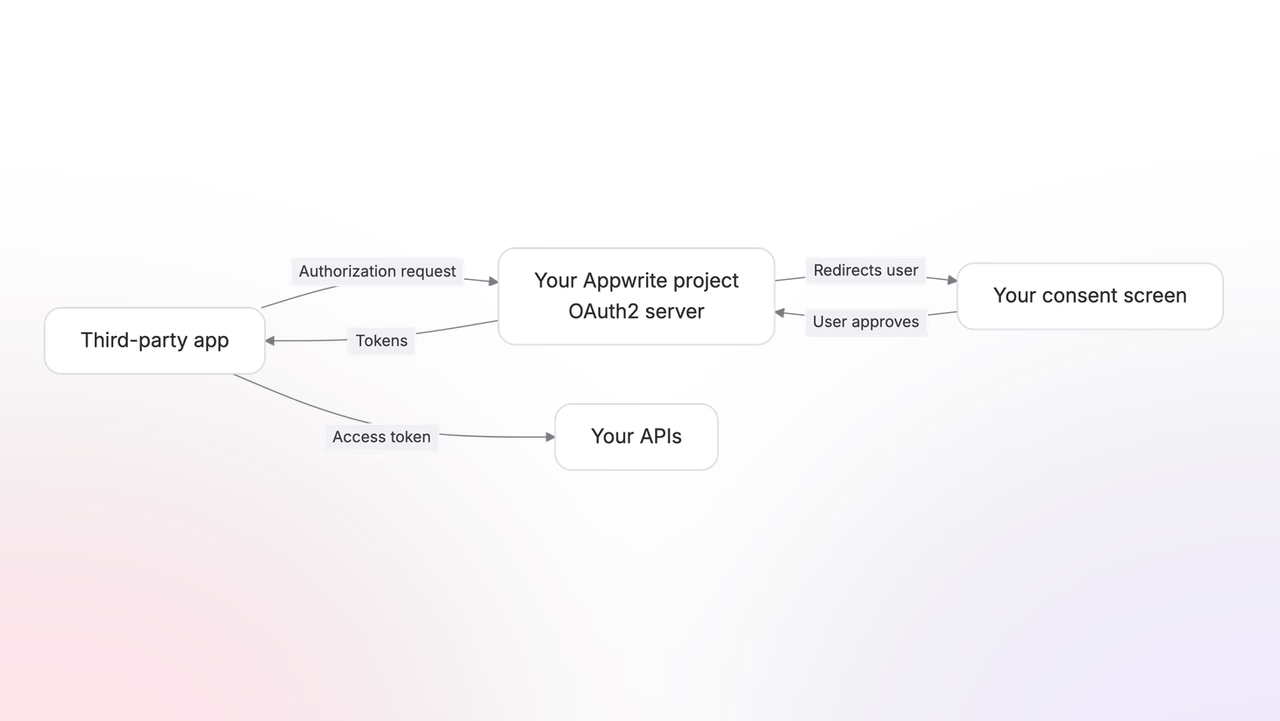
The OAuth2 server has four components.
- The authorization server. Enabling the server on your project exposes the full set of endpoints: discovery, JWKS, authorize, approve and reject, token, userinfo, introspect, logout, and revoke. For more advanced integrations, device authorization, pushed authorization, and dynamic client registration are also available.
- Clients. Each third-party app registers as a client, either confidential (it has a backend that can hold a secret) or public (a browser or mobile app that cannot). A client declares the redirect URIs it can return to and the post-logout redirect URIs it can end sessions at, chooses whether the device flow is available (off by default), and carries what your consent screen shows for it: a name, logo, tagline, and description, along with marketplace details like tags, images, and contact and privacy information.
- The consent screen. You host a consent screen at an authorization URL you configure. When a user authorizes a client, Appwrite redirects the user to your screen, your screen confirms the grant, and Appwrite issues an authorization code the client exchanges for tokens.
- Your APIs. The resource servers that clients call with the issued access tokens. They verify each token against your project's public keys and check the granted scopes before serving a request.
The flow follows the OAuth 2.1 authorization code grant, including PKCE for public clients, plus the OpenID Connect layer for identity. Because the server is spec-compliant, integrators can point any OAuth or OIDC client library at your project's discovery URL and it works without Appwrite-specific code. The URL is the same for every project, with only the project ID changing:
https://<REGION>.cloud.appwrite.io/v1/oauth2/<PROJECT_ID>/.well-known/openid-configurationStandards support
The server follows the OAuth 2.1 security practices: the password and implicit access-token grants are not supported, refresh tokens rotate on every use with reuse detection, and redirect URIs match exactly. The implemented standards:
| Standard | What it covers |
|---|---|
| RFC 6749 | OAuth 2.0, the core of the sign-in implementation. |
| RFC 6750 | Bearer token usage, including WWW-Authenticate error responses. |
| RFC 7009 | Token revocation. |
| RFC 7591 | Dynamic client registration, useful for MCP server support. |
| RFC 7636 | PKCE with S256 hashing. Required for public clients, and a project setting can require it for confidential clients too. |
| RFC 7662 | Token introspection, for building APIs that validate access tokens. |
| RFC 8252 | OAuth for native apps: loopback redirects match on any port, and public clients can register private-use scheme redirect URIs. |
| RFC 8414 | Authorization server metadata, published as the OpenID Connect discovery document. |
| RFC 8628 | Device authorization grant, to sign in on input-constrained devices like TVs and remote servers. |
| RFC 8707 | Resource indicators, so a token can be restricted to one of several APIs behind the same provider. |
| RFC 7517, RFC 7519, RFC 9068 | JWT access tokens with an audience, and the JWK Set published at a well-known URL. |
| RFC 9126 | Pushed authorization requests keep authorization URLs short and protect request parameters from exposure or tampering. |
| RFC 9207 | Authorization server issuer identification: authorization responses carry an iss parameter, so clients can detect mix-up attacks. |
| RFC 9396 | Rich authorization requests, structured constraints where a flat scope says too little. |
| OpenID Connect Core 1.0 | The identity layer: ID tokens and the userinfo endpoint. |
| OpenID Connect RP-Initiated Logout 1.0 | The logout endpoint, with per-client post-logout redirect URIs. |
Concepts
Quick start
Enable the server, register a client, and run your first sign-in end to end.
Clients
Register confidential and public OAuth clients and manage their secrets.
Authorization
The authorization code flow, PKCE, and hosting your own consent screen.
Tokens
Access, refresh, and ID tokens, their lifetimes, introspection, and revocation.
Scopes
The built-in OpenID scopes and the custom scopes your clients can request.
Installations
Let clients install on teams and act with tokens that need no signed-in user.
Device flow
Authorize TVs, CLIs, and other input-constrained devices.
Guides
Was this page helpful?
Share what worked or what we should fix. Once approved, our agents automatically apply suggested updates to the docs.