Start with VectorsDB_
Get started with Appwrite VectorsDB. Follow a step-by-step guide to create your first database, add a collection with a fixed dimension, store embeddings with metadata, and search them by similarity.
3 min read
An embedding is a list of numbers that represents the meaning of a piece of text. Text that means similar things gets similar numbers, even when the wording is different. VectorsDB stores those numbers for you and finds the closest ones to a question you ask, so you can search by meaning instead of by keyword.
In this guide you store three sentences about Appwrite as embeddings, then ask a question in plain English and get back the sentence that answers it. The question and the answer share no words.
These steps use a Server SDK, which requires an API key.
1. Create database
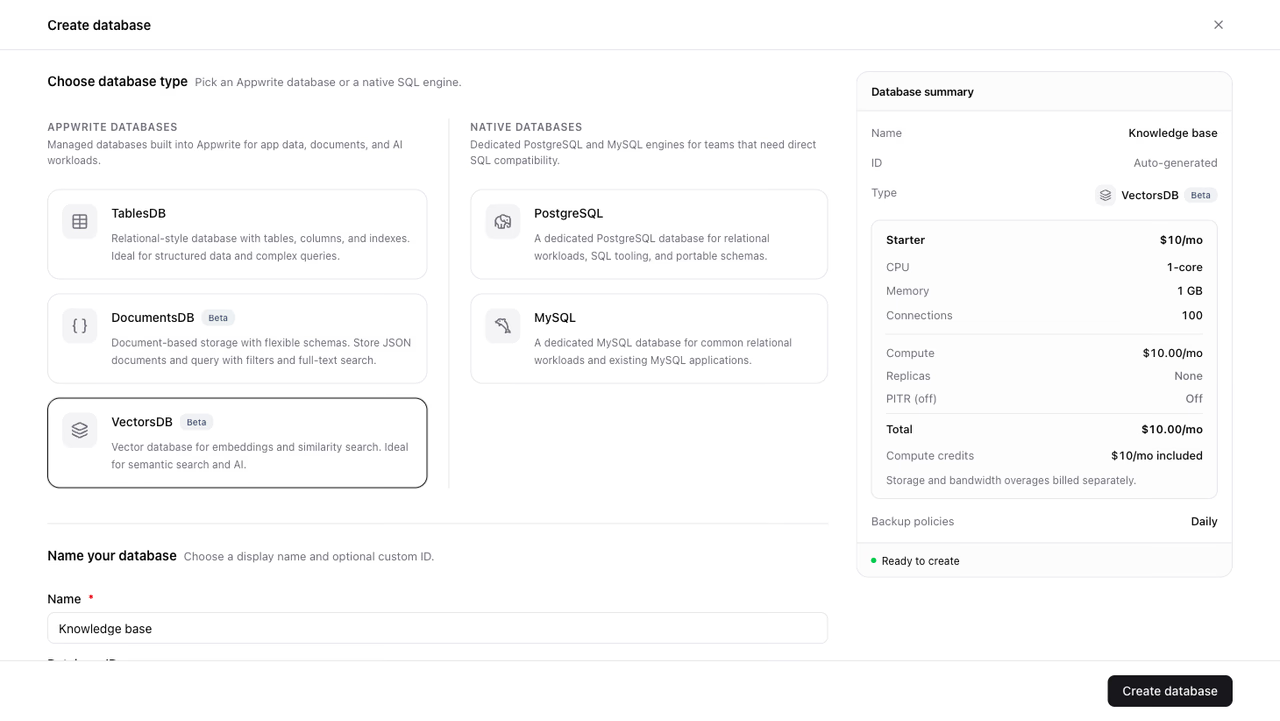
- In your project, go to Databases.
- Click Create database.
- Under Choose database type, select VectorsDB from the Appwrite databases group.
- Name the database
Knowledge base, and optionally add a custom database ID. - Under Specifications, select your preferred tier.
- Review the database summary and click Create database.
2. Create collection
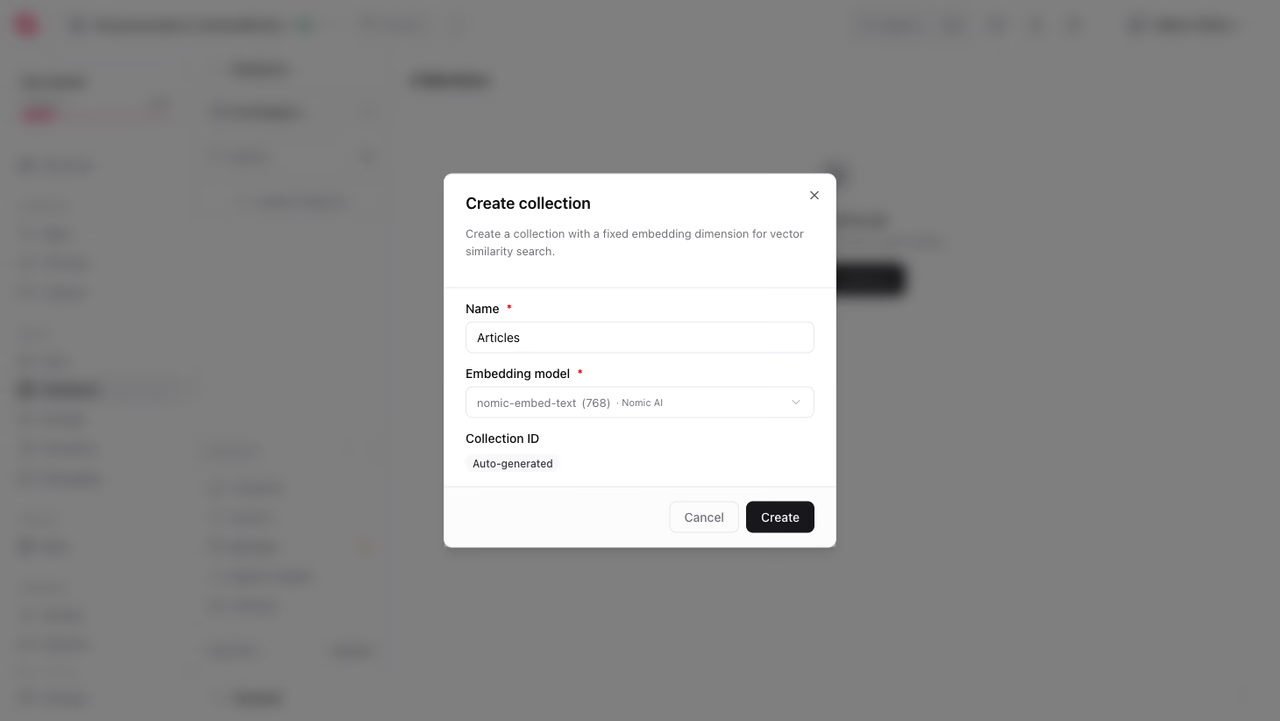
- Open the
Knowledge basedatabase and click Create collection. - Name the collection
Articles, and optionally add a custom collection ID. - Under Embedding model, keep the default
nomic-embed-text. - Click Create.
Every model produces vectors of one fixed length, called the dimension. A collection is locked to a single dimension, so all its documents hold vectors of the same length. Picking the model in the Console sets that dimension for you. nomic-embed-text produces 768 values, which is why the SDK examples below pass dimension: 768.
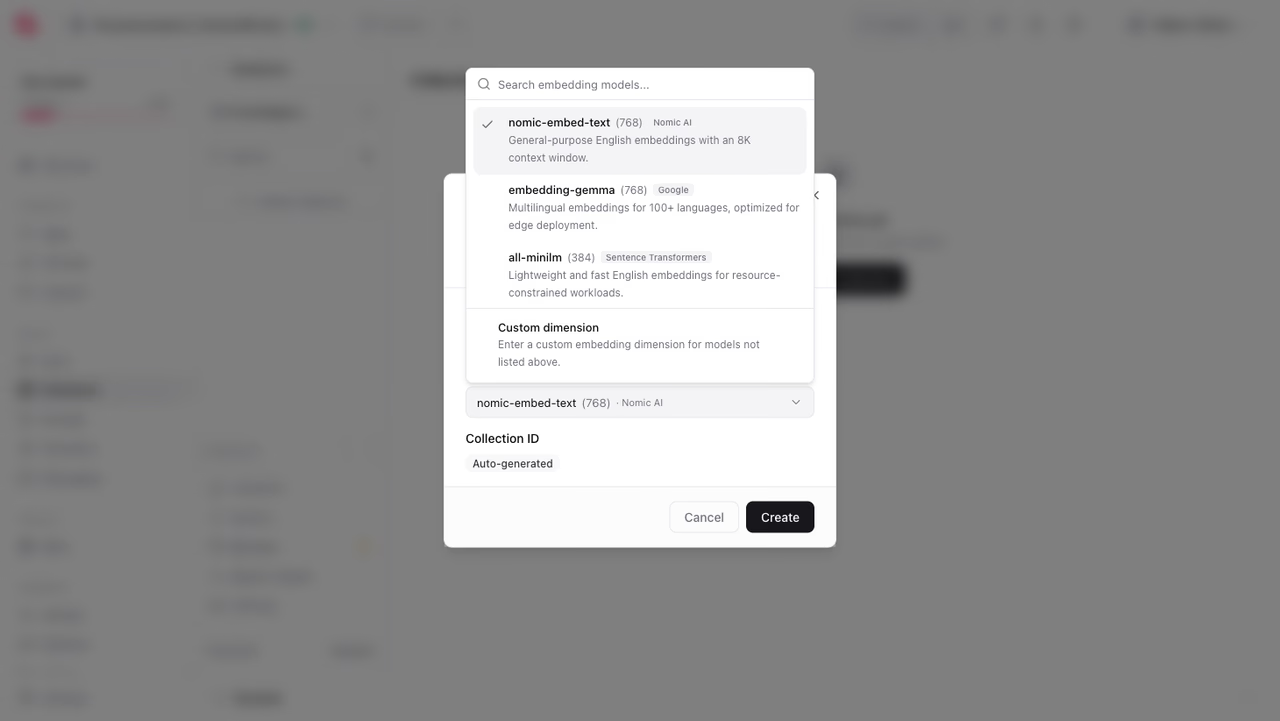
The list scrolls to a fourth model, bge-small, and to a Custom dimension option for a model you run yourself. Read what each one suits in embeddings.
There are no columns to define. Every VectorsDB collection is provisioned with the same shape: an embeddings vector and an optional metadata object.
Add a Read permission for the Any role so anyone can read documents.
3. Store documents
Turn each sentence into an embedding with the Embeddings service, then store the embedding in a document.
A document holds the vector in embeddings and anything else you want in metadata, which is free-form JSON. Store the original sentence there. A search returns documents, and without the text a document is just a list of numbers.
You now have three documents. Each one carries the sentence it was generated from.
4. Read documents
To read documents back from your collection, use the listDocuments method.
5. Search documents
A search starts with a question, not a vector. Turn the question into an embedding the same way you turned your documents into embeddings, then ask for the documents closest to it.
Use the same model for both. Two models describe meaning in their own way, so an embedding from one model tells you nothing about an embedding from another.
The response ranks every document by distance from the question, closest first:
{ "total": 3, "documents": [ { "$distance": 0.42710475406362236, "metadata": { "text": "Appwrite Authentication signs users in and manages sessions." } }, { "$distance": 0.5083307502161881, "metadata": { "text": "Appwrite Storage keeps your files safe." } }, { "$distance": 0.5342290087037317, "metadata": { "text": "Appwrite Functions run your code on demand." } } ]}Nothing in your stored text contains the word "passwords", and the sentence about signing users in still comes back first. A keyword search would have found nothing at all.
A collection this small searches fine without an index. To keep searches fast as the collection grows, and to rank by dot product or Euclidean distance instead of cosine, see vector search.
6. Next steps
You now have a database, a collection, three documents holding embeddings with their text, and a search that ranks them by meaning. From here:
- Pick a different model, or embed several texts in one call, with embeddings.
- Add an index, choose a distance type, and filter results with vector search.
Was this page helpful?
Share what worked or what we should fix. Once approved, our agents automatically apply suggested updates to the docs.