Inside Appwrite's new build cache: 4x faster dependency installs_
A deep dive into how Appwrite now caches your dependencies between builds, and what it means for your deployment times.


Every deployment on Appwrite builds inside a fresh, isolated environment. That isolation is great for reproducibility and security, but it comes with a tax: the build starts with an empty disk, with nothing carried over from previous builds, so your pnpm install re-downloads every package on every deployment, even if you only changed one line of code.
We have now removed that tax. Appwrite's build network caches your dependencies between builds, and restoring them is fast enough that installs on a real-world Next.js app drop from 11.7s → 2.8s with pnpm, and from 9.6s → 2.3s with bun.
Let's look at how it works under the hood.
The problem with clean builds
When you deploy a site or function, Appwrite spins up a dedicated container for the build, runs your install and build commands, uploads the result, and throws the container away, so by design nothing survives between builds.
For dependencies, that means the same work repeats every time. A typical production Next.js app pulls in hundreds of packages, and on every deployment your package manager resolves them, downloads them from the registry, and assembles node_modules from scratch. For the app we will use as an example throughout this post, that is roughly 650 packages re-downloaded for every one-line change.
What we built
The build environment now mounts a cache volume, and the build pipeline does three extra things:
- Before your install command runs, Appwrite checks storage for a cache snapshot belonging to your site or function. If one exists, it is downloaded and unpacked into the package manager's store locations.
- Your build runs unchanged. The package manager finds its store already populated and skips the registry almost entirely.
- After a successful build, the updated store is packed and saved back to storage, so the next build benefits from anything new this one downloaded.
The cache is keyed per resource, so different sites and functions never share snapshots, and a new resource always starts clean.
Why SquashFS
Package manager stores are the worst case for storage systems: tens of thousands of tiny files. Moving them to object storage one by one would drown in per-file overhead, and a classic tar.gz archive is slow to unpack because gzip is single-threaded and extraction creates files strictly in sequence.
Instead, we pack the store into a single SquashFS image, the same compressed, read-only filesystem format Linux live systems boot from. This gives us three properties we wanted:
- Fast compression that decompresses at multiple gigabytes per second, so unpacking is never the bottleneck.
- Parallel packing and unpacking that uses every core available to the build container.
- One file means one storage request. Restoring the cache is a single read, saving it is a single write.
The numbers
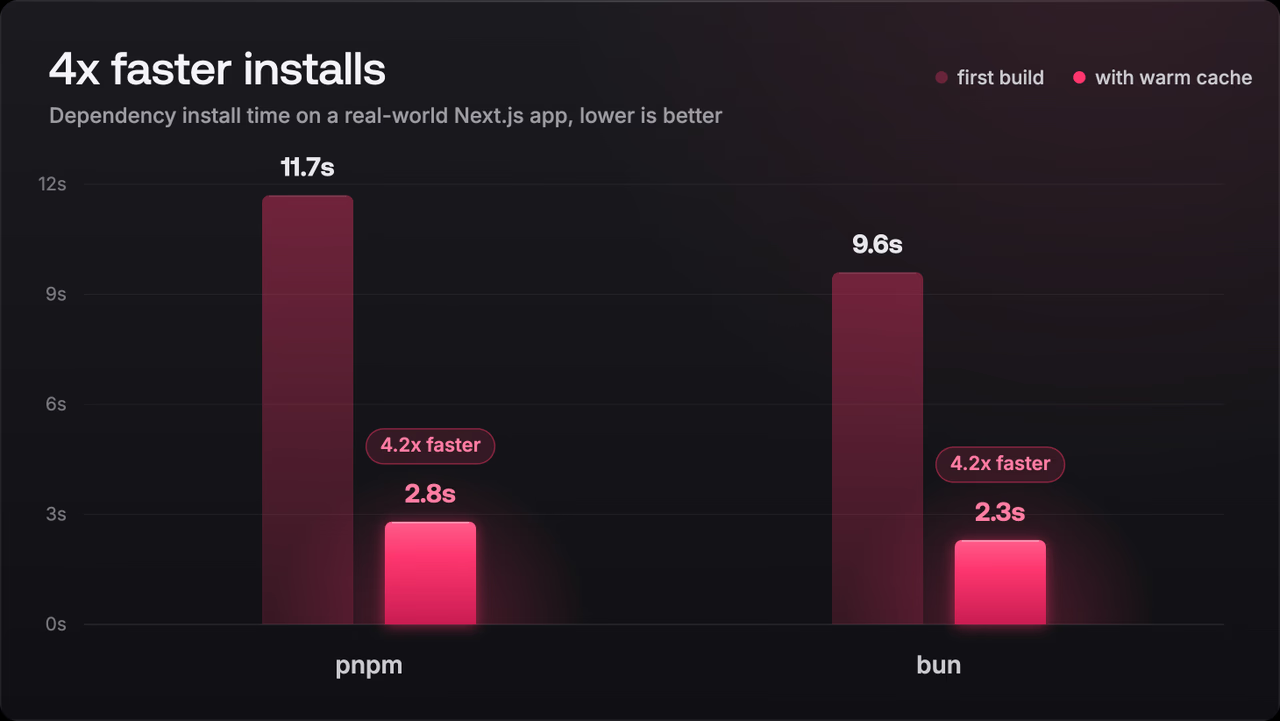
We measured the cache with a Next.js application using 23 production dependencies, deployed through the Appwrite CLI, once with pnpm and once with bun.
With pnpm:
- First build (no snapshot): all 641 packages are downloaded from the registry, and the install completes in 11.7 seconds.
- Every build after: the snapshot is restored before
pnpm installruns, and the same install completes in 2.8 seconds.
With bun:
- First build: 646 packages installed in 9.6 seconds.
- With a warm cache: 2.3 seconds.
That is a 4.2x speedup for both package managers, with zero configuration changes in either case.
The split between those two numbers also tells you where install time actually goes. A warm install does everything a cold one does except talk to the registry, so the difference between the two runs is pure download time:
- pnpm: about 9 of the 11.7 cold-install seconds were downloads, leaving 2.8 seconds of lockfile resolution and linking.
- bun: about 7.3 of its 9.6 seconds were downloads, leaving 2.3 seconds of linking.
The cache removes the download share entirely. The reason the remaining work is so small is that pnpm links packages out of a single content-addressable store and bun uses a similar global cache with hardlinks, instead of unpacking an archive for every package. With the store restored from the snapshot, an install becomes a linking pass over files that are already on disk.
Part of a broader performance effort
The build cache is the latest in a series of changes aimed at making deployments on Appwrite faster. We previously cut cold start times on Appwrite Sites, so your pages respond quickly even after sitting idle, and shipped native Turbopack support, so Next.js applications build on their faster bundler with no change to your build command. Caching dependencies carries that same focus into the install step, which for most projects is the slowest part of a build.
The build cache is live across the Appwrite network. Deploy a site or function, and from your second build onward, your installs are already faster.