Faster Appwrite Sites deployments powered by SquashFS_
Appwrite Sites now packages new deployments with SquashFS, removing archive extraction and cutting the format-dependent cold-start path by up to 51% on larger sites.


The first request to a Site deployment should not spend seconds unpacking files before Appwrite can serve them. That work becomes increasingly expensive as a deployment grows, and at the far end it can turn a cold start into a timeout.
Today, we are moving new Appwrite Sites and Functions deployments on Appwrite Cloud to SquashFS.
SquashFS changes how Appwrite packages and prepares a deployment after the build finishes. Instead of downloading a compressed tar archive and extracting the complete output before it can be used, Appwrite downloads a compressed, read-only filesystem and mounts it directly. Existing Sites and Functions keep running as they do today. To move an existing deployment to the new format, you only need to trigger a new deployment.
What SquashFS gives Appwrite Sites and Functions
- Less work during cold starts: Appwrite mounts the deployment instead of extracting every file before serving it.
- More predictable startup time: Mount duration stays nearly flat as the Site grows, while archive extraction time scales with the amount of content.
- Better results for larger deployments: Sites with larger framework bundles, generated assets, or dependency-heavy server output avoid the longest extraction paths.
- Fewer timeouts: Without an extraction step that grows with size, deployments are less likely to hit the cold-start timeout.
- No application migration: The change is internal to Appwrite's deployment pipeline. Your code, framework, build settings, domains, and environment variables stay the same.
Functions receive the same packaging change. Their artifacts are typically smaller than Site artifacts, so they usually spend less time extracting today and will see a less substantial improvement. Larger Functions can still benefit, but Sites are where we expect the clearest cold-start gains.
Why Appwrite Sites is replacing tar.gz artifacts
A Site deployment is immutable after it has been built. That makes a compressed, read-only filesystem a natural fit for the workload.
With the previous tar.gz format, an edge worker had to complete two format-dependent steps before using a cold deployment:
- Download the archive.
- Extract the entire archive to disk.
The download is efficient because gzip compresses source trees well. The extraction is the problem:
- It touches every file in the deployment.
- It consumes CPU and disk I/O while writing the expanded tree.
- It scales with uncompressed size, not with the bytes downloaded.
A small static page barely notices this work. A large build output can spend several seconds extracting before the platform reaches the rest of its startup path.
SquashFS takes a different approach. It stores the deployment as a compressed filesystem image. Appwrite downloads the image and mounts it as read-only, so the Site can use its files without expanding the complete archive first.
In our production analysis, mount time stayed nearly constant across every artifact-size bucket, while extraction time climbed with the archive:
| Archive size | tar.gz extract | SquashFS mount |
|---|---|---|
| 1 to 5 MB | 0.23s | 0.02 to 0.06s |
| 250 to 500 MB | 12.72s | 0.02 to 0.06s |
The filesystem mount replaces a step whose cost grows with deployment size with one that is close to constant.
Production cold-start results
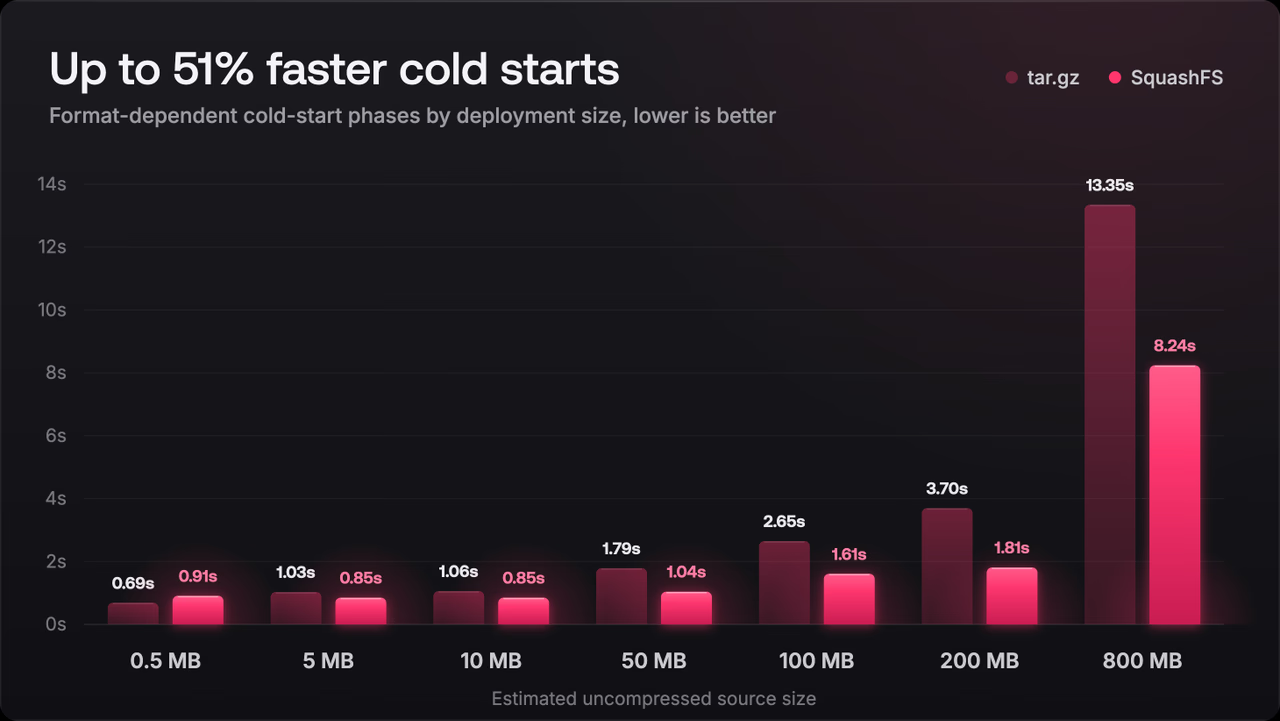
We compared seven-day production means across Sites and Functions using gzip and SquashFS deployments, then normalized the artifact buckets against their estimated uncompressed source size. This matters because the two formats make a different tradeoff: SquashFS artifacts are larger to download, while gzip archives require more work to extract.
The selected scenarios below show the time spent in the format-dependent cold-start phases. These include download, extract or mount, symlink, preparation, and startup.
| Estimated source size | tar.gz phases | SquashFS phases | Relative result |
|---|---|---|---|
| 0.5 MB | 0.69s | 0.91s | SquashFS is 32% slower |
| 5 MB | 1.03s | 0.85s | SquashFS is 17% faster |
| 10 MB | 1.06s | 0.85s | SquashFS is 20% faster |
| 50 MB | 1.79s | 1.04s | SquashFS is 42% faster |
| 100 MB | 2.65s | 1.61s | SquashFS is 39% faster |
| 200 MB | 3.70s | 1.81s | SquashFS is 51% faster |
| 800 MB | 13.35s | 8.24s | SquashFS is 38% faster |
Tiny deployments can still favor gzip because there is almost nothing to extract and the downloaded archive is smaller. The crossover happens quickly: once the uncompressed source is a few megabytes, avoiding extraction offsets the additional download size.
Across the full cold-start path, including format-independent work such as scheduling and image preparation, SquashFS deployments averaged 9.82 seconds compared with 11.01 seconds for gzip. At p95, the result improved from 24.81 seconds to 23.23 seconds.
These figures describe production workloads, not a promise that every Site will improve by the same amount. Network conditions, edge cache state, build output, and framework behavior still contribute to startup time. However, the largest and most consistent improvement comes from eliminating extraction as deployment size increases.
The archive-size tradeoff
SquashFS is not simply a smaller tar archive. It optimizes for a different job.
In a sample of live deployments, the median uncompressed-to-artifact ratio was 5.69x for gzip and 2.62x for SquashFS. For the same source tree, the SquashFS artifact was therefore about 2.2 times larger on the wire. Appwrite accepts that additional download work because mounting the artifact avoids fully expanding it on every cold start.
This tradeoff is most useful for medium and large deployments. Download time can grow with the SquashFS image, but mount time remains almost flat. Gzip downloads fewer bytes, then pays an extraction cost that keeps climbing. Removing that variable step makes the cold-start path more predictable and reduces pressure near the platform timeout.
Deployment artifacts count toward your project's storage allowance on Appwrite Cloud. If your project keeps many inactive deployments, configure deployment retention to delete them after the rollback window your team needs. Appwrite always keeps the active deployment.
Migrate an existing Site with one redeployment
Existing Site deployments are not rewritten in place. Appwrite applies SquashFS when it creates a new deployment, so every existing Site needs one new deployment to receive the change.
To redeploy from the Appwrite Console:
- Open Sites and select your Site.
- Open the three-dots menu on the active deployment.
- Select Redeploy.
If your Site is connected to Git, pushing the next change to its production branch also creates and activates a new deployment. Teams that already ship frequently can pick up SquashFS through their normal workflow. If you want the cold-start improvement immediately, use Redeploy instead of waiting for the next code change.
The same principle applies to deployments created through the CLI or a manual upload: the migration happens when Appwrite builds a new deployment. Your local source package and build output workflow do not need a SquashFS-specific step.
Redeploy your Appwrite Sites and Functions
New Appwrite Sites and Functions deployments on Appwrite Cloud now use SquashFS. Existing deployments continue serving normally, but they only receive the new artifact format after a new deployment is created. Open each production Site and trigger one redeployment when it fits your release process.