Introducing Appwrite Explorer_
Appwrite Explorer brings the Appwrite REST API into the Console. Browse every endpoint, build requests with guided forms, send live calls against your project, and inspect responses without leaving the browser.


Testing an Appwrite endpoint usually means leaving the Console: open Postman, hunt for the right path in the docs, paste your project ID and API key, and hope the request body matches the schema.
That friction adds up when you are debugging a function, validating permissions, or walking a teammate through an API flow.
Today we are introducing Appwrite Explorer: a built-in API workspace for every project. Browse the full Appwrite REST surface, fill in parameters with guided forms, send live requests, and read the response right next to the Console UI you already use.
Less context switching, faster answers
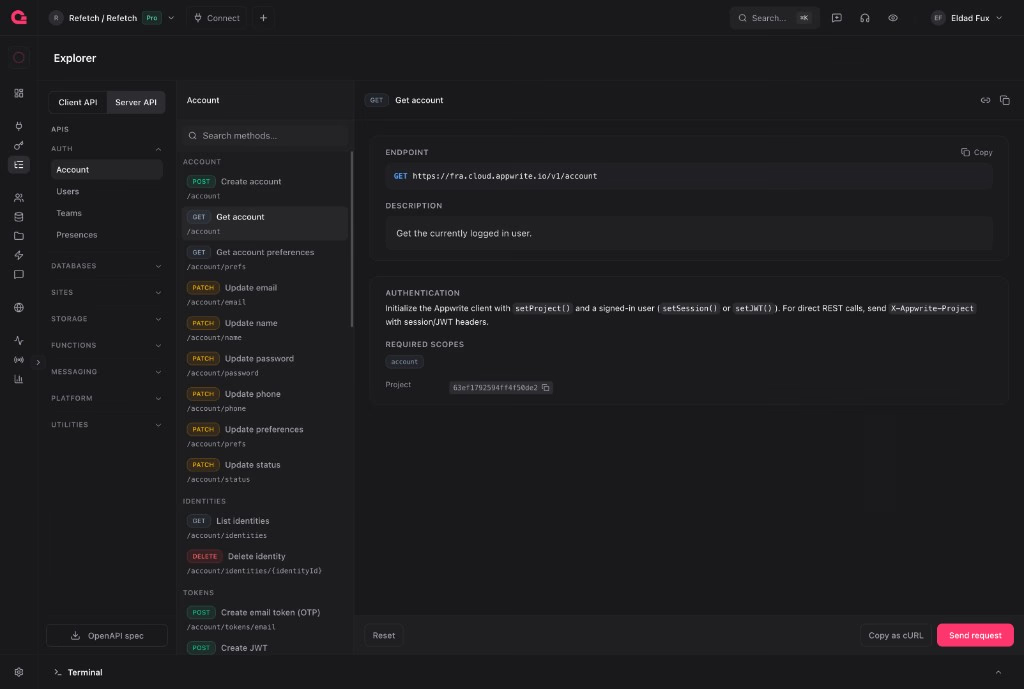
Appwrite Explorer is available from the Connect section in the project sidebar at /projects/{projectId}/explorer. Pick a service, choose a method, fill in path, query, and body fields, then send the request. The response panel opens with status, timing, formatted JSON, and response headers.
The goal is the same as Appwrite Terminal: keep you inside the Console when you need to interact with Appwrite programmatically.
Built on the official OpenAPI spec
Explorer loads the latest Appwrite OpenAPI definitions bundled with @appwrite.io/specs. Those specs are not maintained by hand in a separate docs repo. They are generated programmatically from the Appwrite server source code on every release, using the same specs CLI task that publishes to appwrite/specs. Route handlers, request models, response schemas, scopes, rate limits, and Appwrite-specific metadata (under x-appwrite) all flow from the codebase into the OpenAPI output.
That single pipeline is why Explorer stays trustworthy:
- No documentation drift. The forms, parameter types, and validation rules you see are derived from the same definitions that power the live API and every official SDK, not from reference pages that can fall behind.
- Release parity. When a new endpoint ships, it appears in Explorer as soon as the Console bundles the matching spec version. You are not waiting for someone to rewrite docs by hand.
- One artifact, many surfaces. API reference, SDK generation, and Explorer all consume the same spec files, so what you test in the browser is what your SDK calls in production.
- Accurate metadata inline. Required scopes, rate limits, Client vs Server availability, and deprecation notices come from server configuration, which is why Explorer can show them before you send a request.
Endpoints are grouped into product areas that mirror how you think about the platform:
- Auth (Account, Users, Teams, Presences)
- Databases (TablesDB, DocumentsDB, VectorsDB when enabled)
- Sites, Storage, Functions, Messaging
- Platform (Project, Webhooks, Proxy)
- Utilities (Locale, Avatars)
Switch between Server API and Client API to see the endpoints available to each SDK surface. You can also download the OpenAPI JSON for either platform from the services panel.
Compose requests without guessing JSON
Each method renders a request builder driven by the schema:
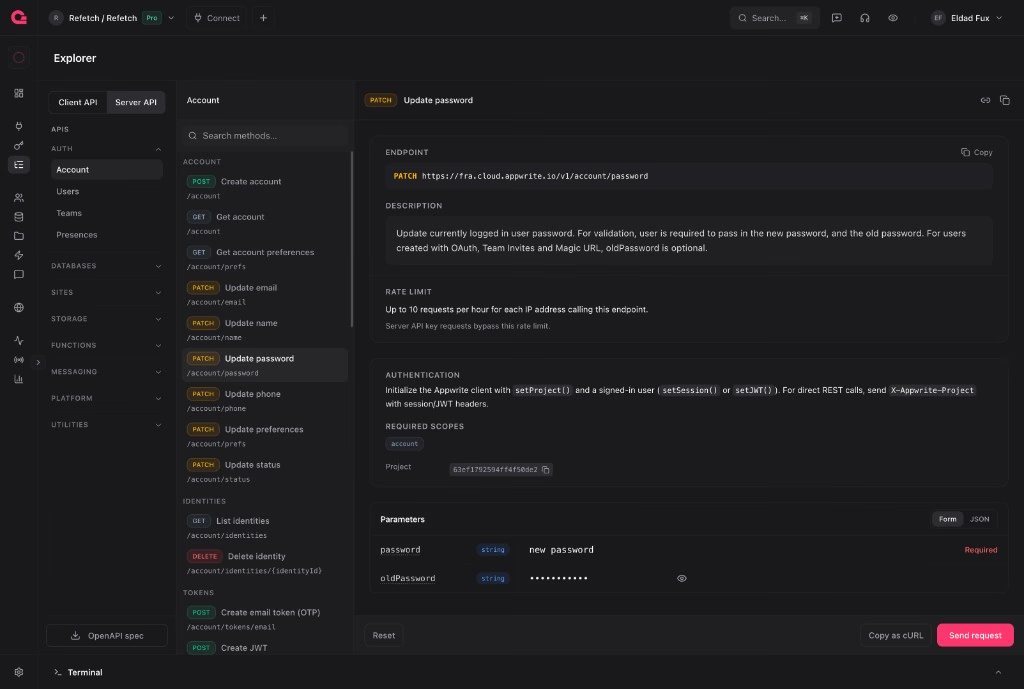
- Path and query parameters with typed inputs
- Body fields as a form, or raw JSON when the schema supports it
- Query builder helpers for TablesDB-style filter arrays
- Permissions editor for endpoints that accept Appwrite permission strings
- Multipart support for file upload endpoints
Required fields are validated before send. Reset restores the method defaults if you want a clean slate.
Method descriptions, rate limits, auth requirements, and deprecation notices appear inline so you know what you are calling before you send it.
Authentication that fits the endpoint
Explorer adapts auth to the platform and method:
Server API
- Paste an existing project API key
- Generate ephemeral key scoped to the method's required permissions (expires in one hour)
- Scope editor to add or remove permissions on draft keys before generation
Client API
- Guest mode for public client endpoints
- Act as user with a searchable user picker; Explorer creates a short-lived JWT via the admin API
Your platform choice and auth settings persist per project in local storage, so returning to Explorer picks up where you left off.
Explorer test requests intentionally omit browser session cookies from the project API call, so results reflect the API key or JWT you configured, not your Console login.
Send, inspect, and share
When a response returns, Explorer shows:
- HTTP status with success, warning, or error styling
- Response time in milliseconds
- Content type badge
- Body tab with formatted JSON (or an image preview for binary preview endpoints)
- Headers tab with copy support
- Response size in the footer
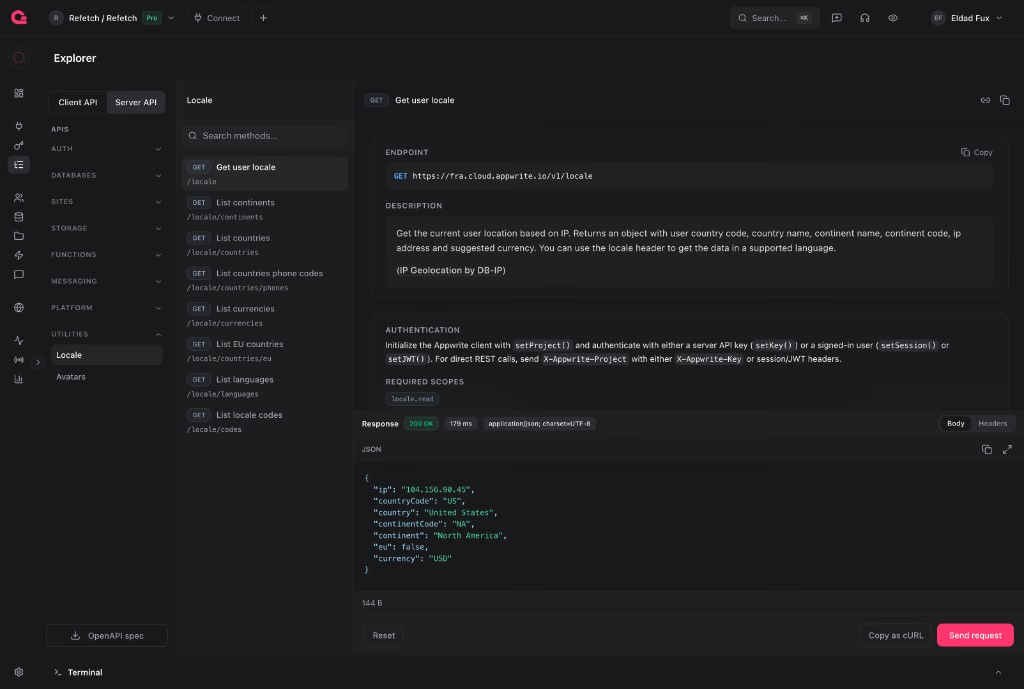
From the request footer you can Copy as cURL to move the exact call into a script or share it in chat. Method headers include Copy link (deep link to the method in Explorer) and Copy page (markdown export for internal docs).
Destructive or mutating operations (DELETE, PUT, PATCH, and update-style POST calls) open a confirmation dialog before the live request runs.
Keyboard-first sending
Explorer is optimized for repeat testing:
| Shortcut (macOS) | Shortcut (Windows / Linux) | Action |
|---|---|---|
⌘ + Enter | Ctrl + Enter | Send request (when Explorer is focused) |
Open the Command Center with ⌘ + K (or Ctrl + K) and press G then X to jump straight to Explorer from any project route.
Layout that remembers your workflow
The three-column layout (services, methods, request) and the optional request/response split are resizable. Column widths and the open product group accordion persist in your account preferences, so Explorer feels the same every time you open it.
Method search filters the endpoint list within the selected service. URL search params (service and operation) deep-link to a specific method, which makes sharing endpoints with teammates straightforward.
Who can use it
When organization roles are enabled, Appwrite Explorer is available to owners and developers on the project's organization, alongside Apps and API Keys in the Connect section.
Try it now
Open a project, go to Connect → Explorer, or press G then X. Start with a read-only call:
- Choose Users under Auth
- Select List users
- Generate an ephemeral API key or paste a key with
users.read - Press Send request (or
⌘/Ctrl+Enter)
Appwrite Explorer meets you where you already manage your project: browse the API, send the request, and read the answer without switching tools.