Announcing CSV exports: Effortless data extraction, right from your Console_
Export your data to a CSV file directly from the Appwrite Console. Filter, customize, and download your data in just a few clicks.

Data flows through every system you build, for reporting, analysis, or integrations. Getting it out cleanly and consistently should be just as simple as storing it.
The new CSV exports feature in Appwrite Console lets you generate CSV files directly from your tables. No SDKs, no manual formatting. Just fast, reliable data exports that fit right into your workflow.
Export your data, your way.
Before this release, exporting data meant using the SDK or REST API, looping through paginated results, and formatting them yourself. It was slow, brittle, and far from ideal for quick exports or non-developer teammates.
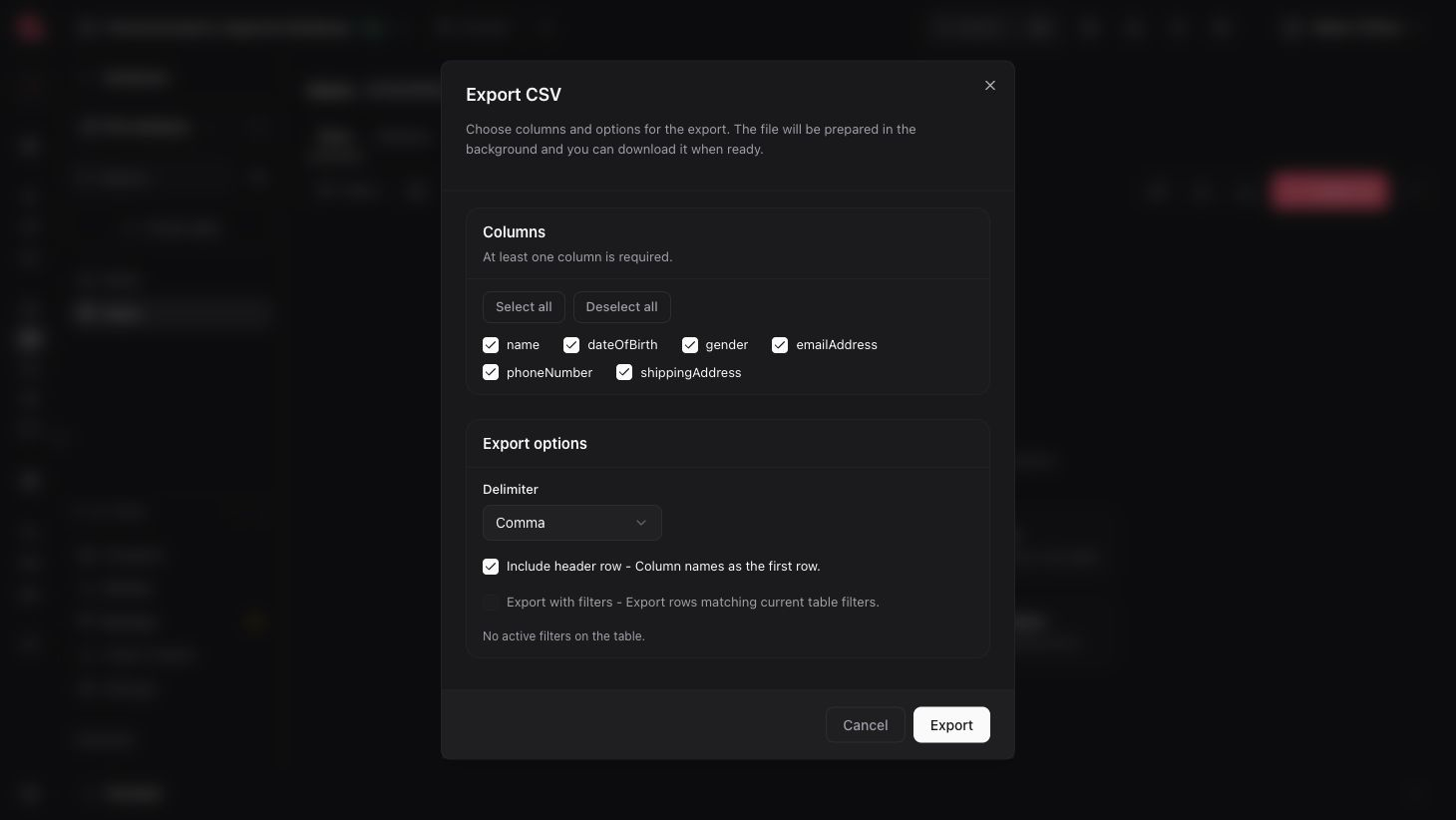
With CSV exports, you can now download a CSV file directly from the Console. Simply open a table, apply filters or queries, choose which columns to include, and export. All in a few clicks.
Appwrite handles the rest behind the scenes: creating the file, running the export in the background, and emailing you a short-lived download link when it's ready.
Built for real-world workflows
Whether you're handing data off to a product manager, building reports for finance, or keeping backups for compliance, Appwrite's CSV exports make it effortless to get clean, structured data out of your tables.
Use it for:
- Reports and analytics: Share data snapshots with PMs or analysts for review
- Compliance and audits: Generate clean exports for regulatory or security checks
- Data handoffs: Easily provide datasets to marketing, finance, or support teams
- Migrations and backups: Archive your data or move it between environments
- Integrations: Ingest Appwrite data into external platforms and BI tools
Fully customizable exports
CSV exports are built to adapt to your workflow, with a rich set of customization options that let you control exactly how your data is exported.
You can:
- Apply specific queries: Export only the data that matches your current filters or search parameters.
- Pick your columns: Choose which columns to include. Keeping your CSV lean and focused.
- Set a custom delimiter: Format your data the way your tools expect it.
- Include or skip headers: Add an optional header row for readability.
- Run in the background: Appwrite processes exports asynchronously, so you can continue working while it completes.
- Get notified: Receive an email with a short-lived download link when the export is ready.
- Handle relationships cleanly: Related rows are exported as IDs by default, ensuring your data stays structured and easy to use.
This flexibility makes CSV exports powerful enough for developers and simple enough for non-technical team members.
Available now
CSV exports are now live for Appwrite Cloud and will be coming soon to self-hosted.