Bun 1.4 lands on Appwrite: the first Bun written in Rust_
Bun 1.4 is now available as a runtime for Appwrite Functions and as a build runtime for Appwrite Sites. We benchmarked it against Bun 1.3 and Node 26.


Bun 1.4 is now available on Appwrite Cloud, as a runtime for Appwrite Functions and Appwrite Sites. You can pick bun-1.4 for new functions today, switch existing functions over with a redeploy, and select it in the build runtime dropdown for any Node-based Sites framework.
Version bumps to a runtime line are usually routine, but Bun 1.4 is the first release of Bun written in Rust, and the release before it, 1.3.14, was the last one written in Zig. The team and the test suite stayed the same while the language underneath changed. We wanted to know what that means in practice for functions and site builds, so we benchmarked it. The numbers are further down.
What's in Bun 1.4
The release covers everything shipped since Bun 1.3.0. The parts that matter most for serverless workloads:
- Node.js 26 compatibility. Bun now reports Node.js 26 and passes 1,517 more tests from Node's own test suite than 1.3 did, the largest compatibility jump since Bun 1.0. Playwright, Next.js 16, Vitest, and OpenTelemetry now work.
- Faster startup. A hello-world script starts in 5.1 ms on Linux, down from 10.9 ms in Bun 1.3. Node 26 takes 27.2 ms on the same machine.
- Less memory. HTTP servers use 13 to 48% less peak memory. Express drops from 169 MB to 92 MB under load, Next.js from 397 MB to 285 MB.
- Lower idle cost. An idle server burns 5x less CPU than on Bun 1.3, after the team replaced JavaScriptCore's allocator with a unified mimalloc heap.
- Faster installs. The isolated linker gets a global virtual store, making warm CI installs up to 7x faster on large dependency trees.
- Native Web Streams. ReadableStream and friends moved to a native implementation with automatic backpressure, so a slow client can no longer balloon server memory.
There are also fifteen new built-in APIs that replace common npm dependencies, including Bun.Image for image processing, Bun.markdown for Markdown rendering, and Bun.cron() for scheduled jobs. The release post has the full list.
A few changes can bite when you upgrade. TLS certificate verification got stricter, Bun.YAML now follows YAML 1.2, and Bun invoked as node no longer auto-loads .env files. Most function code is unaffected, but the upgrade notes are worth two minutes before you switch production traffic.
A runtime rewritten by AI agents
Bun's entire codebase, around 780,000 lines, was ported from Zig to Rust, and the port was not written by hand. The Bun team ran roughly 64 Claude agents concurrently over 11 days, landing 6,778 commits and a diff of over a million lines. The merge gate was strict: the full test suite passing on all platforms, with zero tests skipped or deleted.
The engine underneath did not change. Bun still embeds JavaScriptCore, which is C++, so your JavaScript executes exactly as before. What changed is everything around it: the HTTP server, the bundler, the package manager, the file system layer. The team reports the Rust port fixed 128 bugs that reproduce in 1.3.14, eliminated every memory leak they could instrument, and picked up 2 to 5% more HTTP throughput from cross-language link-time optimization between Rust and the C++ engine.
Before the release, the Rust port ran in production for months inside Claude Code. Jarred Sumner's write-up, Bun in Rust, covers the process in detail, including what the agents got wrong along the way. It is worth reading whether or not you use Bun, because a million-line port with a green test suite says as much about where software development is going as it does about Bun.
Benchmark: build times on Appwrite Cloud
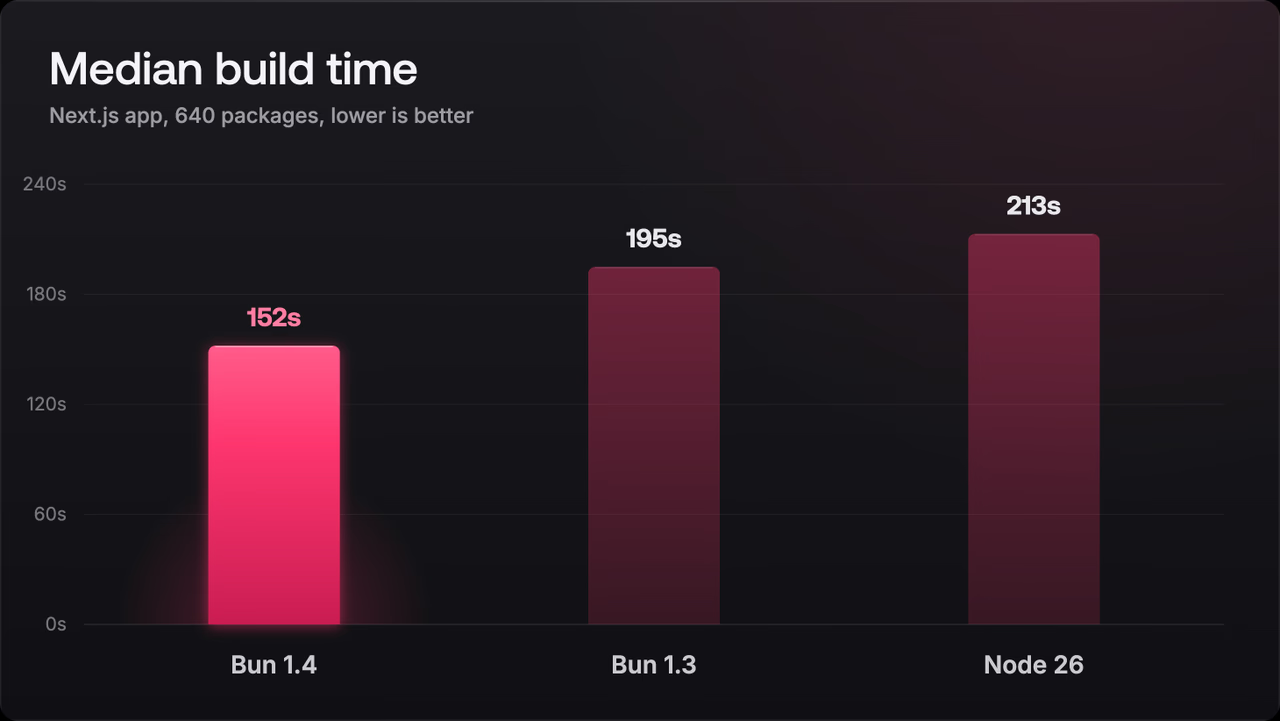
Faster installs and faster startup should add up to faster deployments, so we measured the one number every deploy pays: build time. We deployed the same app five times per runtime on Appwrite Cloud and compared Bun 1.4 against Bun 1.3 and Node 26.
The setup:
- A Next.js SSR app with a deliberately heavy dependency tree: 640 packages, including MUI, Ant Design, AWS SDK clients, Apollo, D3, and Three.js
- Build resources set to 4 vCPU and 4 GB RAM, in the Frankfurt region
- No lockfile committed, so every build resolves and installs from scratch
- Bun runtimes install with
bun install, Node installs withnpm install, which is what each runtime uses by default on Appwrite - Build duration as reported by the Appwrite deployment, which covers install and
next buildtogether
The results, five builds per runtime:
| Runtime | Build times (seconds) | Median |
|---|---|---|
| Bun 1.4 | 141, 142, 152, 165, 181 | 152 s |
| Bun 1.3 | 142, 187, 195, 200, 211 | 195 s |
| Node 26 (npm) | 187, 209, 213, 227, 268 | 213 s |
What stands out:
- Bun 1.4's median build is 22% faster than Bun 1.3 on the identical app, with no code or configuration changes, so the difference comes from the runtime upgrade alone.
- Against Node 26 with npm, the median gap grows to 29%, about a minute saved on every deploy of this app.
- Bun 1.4 was also the most consistent of the three, with a 40-second spread across five builds against 69 seconds for Bun 1.3 and 81 seconds for Node.
The usual caveats apply. These are our runs, on one app, on one day. Your dependency tree will produce different numbers. But the ordering held across every run we did, and a minute off every deploy compounds quickly when you ship several times a day.
Switching to Bun 1.4
For Functions, create a new function and pick bun-1.4 from the runtime list, or open an existing Bun function's settings and change the runtime version. The change applies on the next deployment.
For Sites, open your site in the Appwrite Console, go to Site settings, then Runtime settings, and select Bun 1.4 as the build runtime. Your live deployment keeps serving traffic until you redeploy.
Bun 1.4 is available on Appwrite Cloud today, alongside the existing 1.0 through 1.3 versions for projects pinned to an older release.