Vector DB and embeddings_
Build semantic search on Appwrite VectorsDB. Generate embeddings, store them alongside your content, and rank results by meaning with a TanStack Start app.
4 min read
An embedding is a list of numbers that represents the meaning of a piece of text. Text with similar meaning produces vectors that sit close together, so you can rank content by meaning instead of by matching words. This is what powers semantic search, recommendations, and retrieval for AI applications.
Appwrite VectorsDB stores those vectors and searches them. It generates embeddings with built-in models, keeps each vector next to the content it came from, and returns results ordered by distance. You do not run a separate embedding service or a separate vector database.
In this guide you build a support center where a reader describes a problem in their own words and gets the article that answers it, even when the two share no words at all.
Prerequisites
- An Appwrite project
- An API key with the
databases.read,databases.write,collections.read,collections.write,documents.read,documents.write, andembeddings.writescopes - Node.js 22 or later
1. Create a database
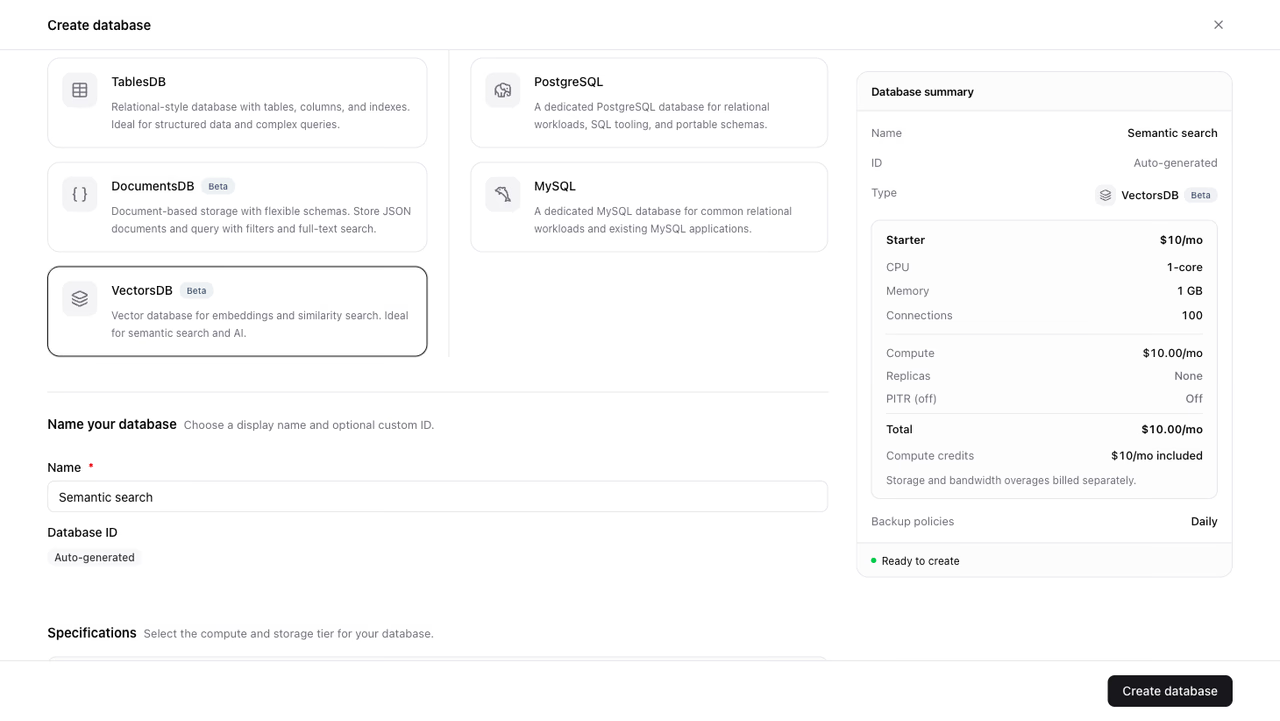
In the Appwrite Console, open Databases and click Create database. Select VectorsDB as the database type, name it Semantic search, and create it.
2. Create a collection
Open the database and click Create collection. Name it Articles and pick an embedding model.
The model decides how many components each vector carries, and a collection stores vectors of one fixed width. nomic-embed-text produces 768 components, so the collection accepts 768-component vectors and nothing else. Choose the model you plan to embed with, since changing it later means creating a new collection.
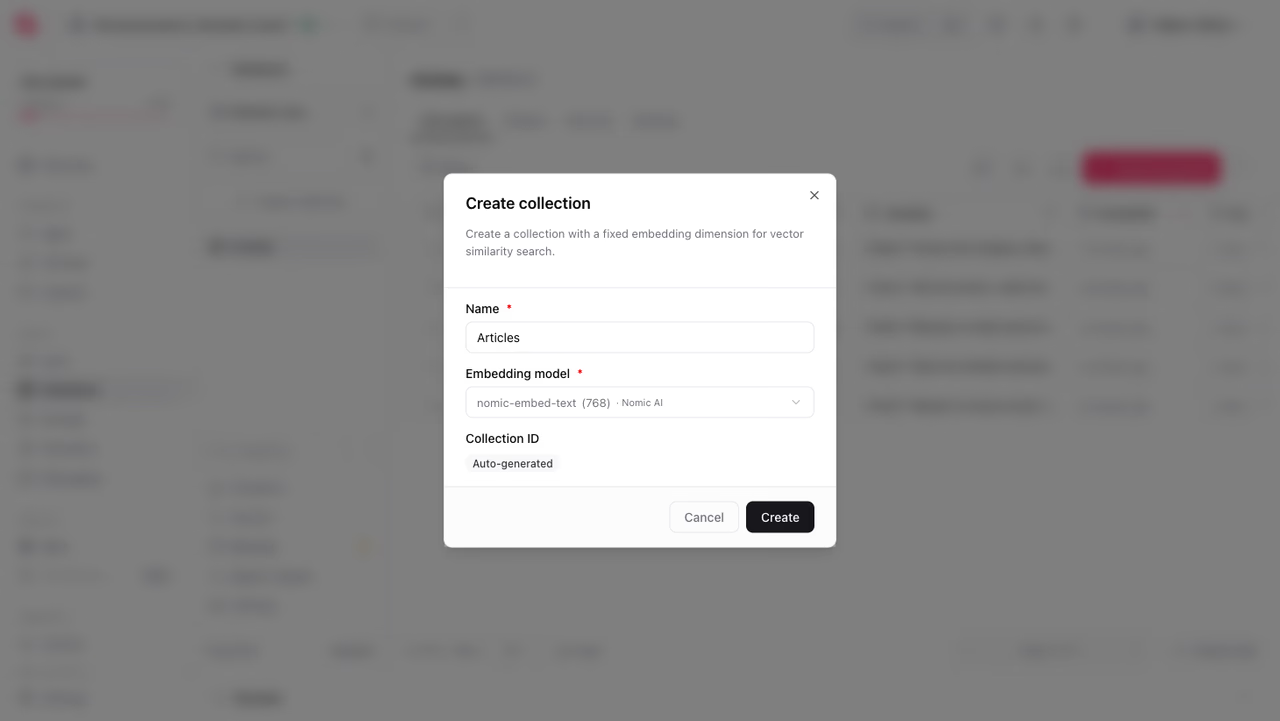
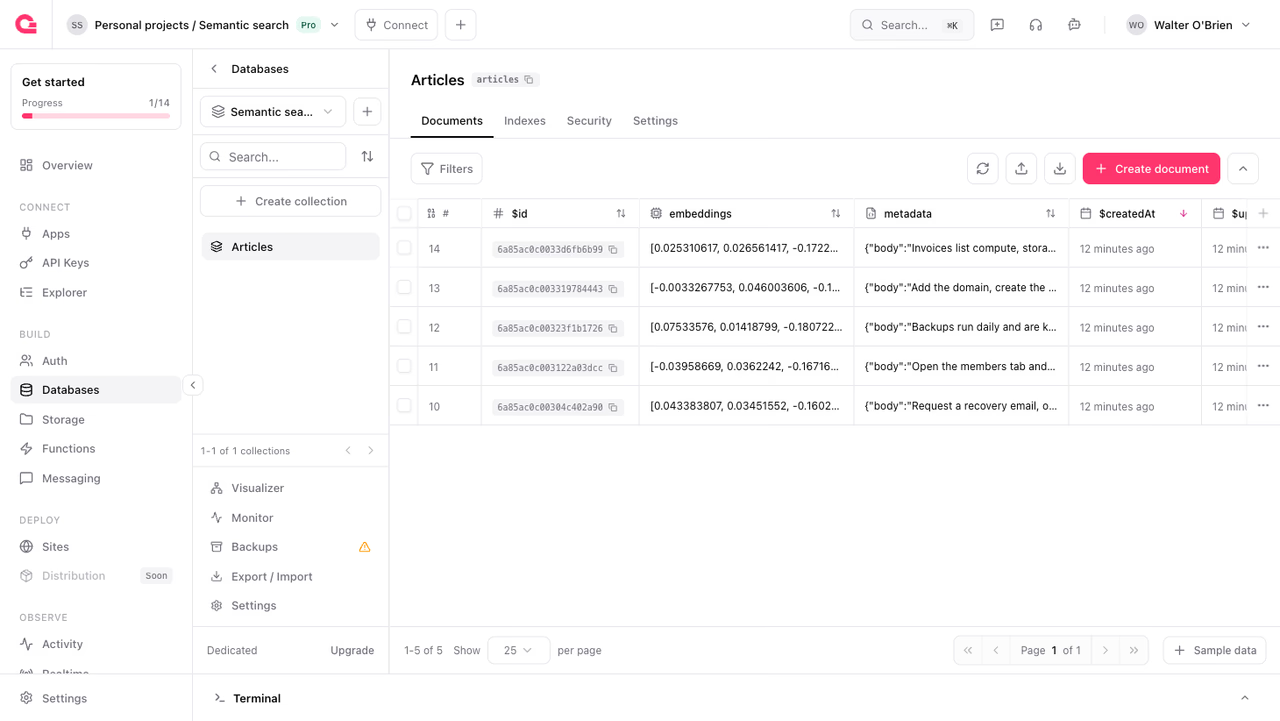
Every collection arrives with two fields. embeddings holds the vector, and metadata holds a JSON object where you keep the content the vector was built from.
3. Add a similarity index
Searches run against an index on the embeddings field. Create an HNSW index, an approximate nearest neighbour structure that keeps similarity search fast as the collection grows.
The index type decides how similarity is measured, and it has to match the query you plan to run. Use hnsw_cosine with Query.vectorCosine, hnsw_dot with Query.vectorDot, and hnsw_euclidean with Query.vectorEuclidean. Cosine is the common choice for text, since it compares direction and ignores magnitude.
import { Client, VectorsDB, VectorsDBIndexType } from 'node-appwrite';
const client = new Client()  .setEndpoint('https://<REGION>.cloud.appwrite.io/v1')  .setProject('<PROJECT_ID>')  .setKey('<API_KEY>');
const vectorsDB = new VectorsDB(client);
await vectorsDB.createIndex({  databaseId: '<DATABASE_ID>',  collectionId: '<COLLECTION_ID>',  key: 'embeddings_cosine',  type: VectorsDBIndexType.HnswCosine,  attributes: ['embeddings']});
4. Create the app
Create a TanStack Start app and install the Appwrite SDK.
npm create @tanstack/start@latest orbit-supportcd orbit-supportnpm install node-appwriteAdd the project details to .env. The API key is a server credential, so it stays out of any file the browser loads.
APPWRITE_ENDPOINT=https://<REGION>.cloud.appwrite.io/v1APPWRITE_PROJECT_ID=<PROJECT_ID>APPWRITE_API_KEY=<API_KEY>APPWRITE_DATABASE_ID=<DATABASE_ID>APPWRITE_COLLECTION_ID=<COLLECTION_ID>5. Generate embeddings
Create src/lib/search.server.ts. The .server.ts suffix keeps this module, and the API key it reads, on the server.
createTextEmbeddings accepts an array of strings and returns one vector per string, so a batch of articles costs a single call.
import { Client, Embeddings, ID, Query, VectorsDB } from 'node-appwrite';
const client = new Client()  .setEndpoint(process.env.APPWRITE_ENDPOINT)  .setProject(process.env.APPWRITE_PROJECT_ID)  .setKey(process.env.APPWRITE_API_KEY);
const embeddings = new Embeddings(client);const vectorsDB = new VectorsDB(client);
export async function embed(texts: string[]): Promise<number[][]> {  const result = await embeddings.createTextEmbeddings({    texts,    model: 'nomic-embed-text'  });
  return result.embeddings.map((entry) => entry.embedding);}
6. Store articles as vectors
Each article becomes one document: the vector in embeddings, and the text it came from in metadata. Storing the text alongside the vector means a search result carries everything you need to render it, with no second lookup.
Embed the title and body together so the vector represents the whole article.
export async function addArticle(title: string, body: string): Promise<void> {  const [embedding] = await embed([`${title}. ${body}`]);
  await vectorsDB.createDocument({    databaseId: process.env.APPWRITE_DATABASE_ID,    collectionId: process.env.APPWRITE_COLLECTION_ID,    documentId: ID.unique(),    data: {      embeddings: embedding,      metadata: { title, body }    }  });}
Call it once for each article you want to make searchable. The collection view in the Console shows the stored vector next to its metadata.
7. Search by meaning
Searching takes two steps: embed the question with the same model used for the articles, then pass that vector to listDocuments as a similarity query.
Each result carries a $distance, the cosine distance between the question and the article. Lower means closer in meaning, so results arrive in ascending order and 0 would be an exact match.
export async function searchArticles(question: string, limit = 5) {  const [vector] = await embed([question]);
  const result = await vectorsDB.listDocuments({    databaseId: process.env.APPWRITE_DATABASE_ID,    collectionId: process.env.APPWRITE_COLLECTION_ID,    queries: [Query.vectorCosine('embeddings', vector), Query.limit(limit)]  });
  return result.documents.map((document) => ({    id: document.$id,    title: document.metadata.title,    body: document.metadata.body,    distance: document.$distance  }));}
A question and an article have to be embedded by the same model to be comparable. Vectors from different models are not interchangeable, even when they carry the same number of components.
8. Add the search page
Wrap the search in a server function so the query runs on the server, then render the results in a route.
import { createFileRoute } from '@tanstack/react-router';import { createServerFn } from '@tanstack/react-start';import { useState } from 'react';import { searchArticles } from '../lib/search.server';
const search = createServerFn({ method: 'POST' })  .validator((question: string) => question)  .handler(async ({ data }) => {    const question = data.trim();    return question ? searchArticles(question) : [];  });
export const Route = createFileRoute('/')({ component: Home });
function Home() {  const [question, setQuestion] = useState('');  const [results, setResults] = useState([]);
  async function onSubmit(event) {    event.preventDefault();    setResults(await search({ data: question }));  }
  return (    <main>      <form onSubmit={onSubmit}>        <input          value={question}          onChange={(event) => setQuestion(event.target.value)}          placeholder="What do you need help with?"        />        <button type="submit">Search</button>      </form>
      <ol>        {results.map((article) => (          <li key={article.id}>            <h2>{article.title}</h2>            <span>{article.distance.toFixed(3)}</span>            <p>{article.body}</p>          </li>        ))}      </ol>    </main>  );}
Run npm run dev and ask something the articles never say. A question like "I cannot get into my account" returns the password recovery article first, because the meanings match even though the words do not.
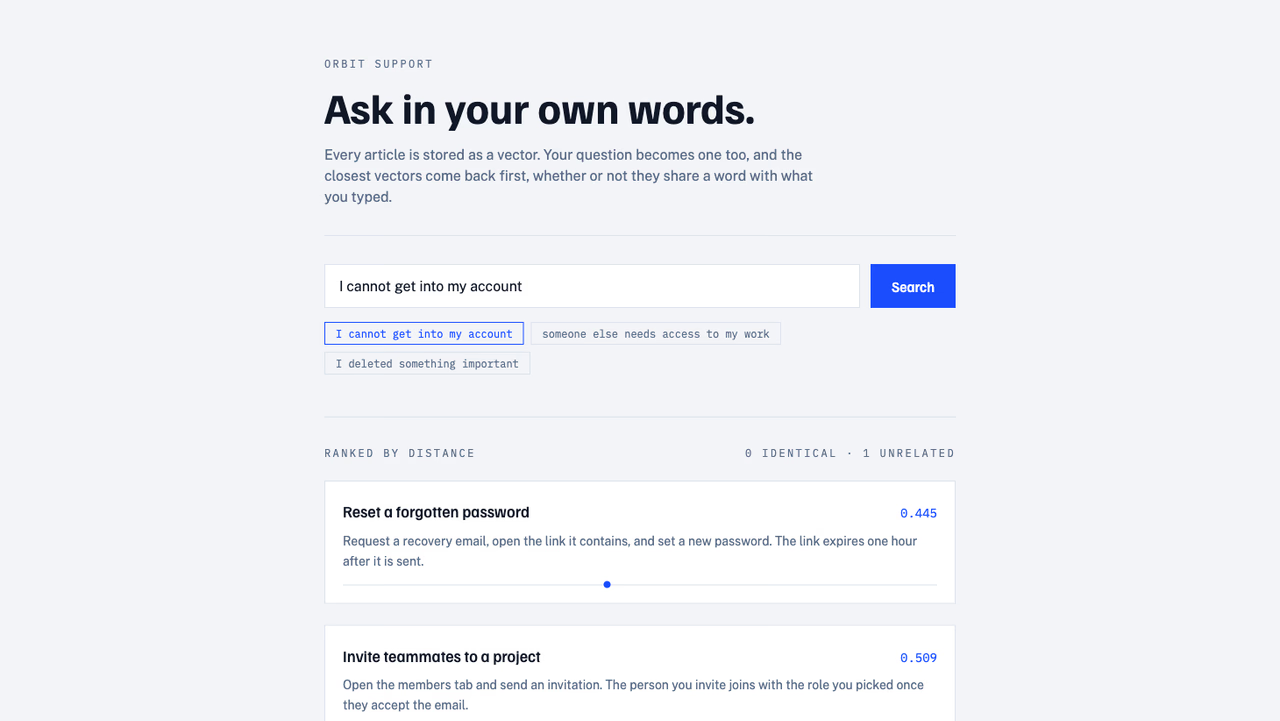
Showing the distance next to each result is worth keeping while you tune your content. It tells you how far the second result sits from the first, which is the quickest way to see whether your articles are distinct enough from each other.
9. Deploy the app
Push the project to a Git repository and deploy it on Appwrite Sites. Add the same environment variables in the site's settings, since the search runs on the server side of the deployment.
Next steps
VectorsDB supports more than similarity search alone. You can filter on metadata fields to scope a search to one category, page through results with cursors, and group writes into a transaction.
Was this page helpful?
Share what worked or what we should fix. Once approved, our agents automatically apply suggested updates to the docs.