What is CIDR? A complete guide for developers_
Learn what CIDR is, how CIDR notation like 10.0.0.0/8 works, how to read prefix lengths and calculate ranges, and how to use CIDR blocks in real firewall rules.

CIDR (Classless Inter-Domain Routing) is the standard way to describe a range of IP addresses using a compact notation like 192.168.1.0/24, where the number after the slash tells you how many addresses the range covers.
You've almost certainly typed CIDR notation before. It's in every VPC config, every Kubernetes network policy, every firewall rule that takes an IP range. What's less common is actually being taught how to read it. Most of us picked it up by copying 10.0.0.0/8 from a tutorial and moving on, and the /8 stayed a mystery for years.
It doesn't need to be. The whole system rests on one idea that takes about two minutes to learn, and once you have it, firewall rules and routing tables stop being cargo-cult copy-paste. So let's learn it properly, then put it to work in some real firewall rules.
What does CIDR stand for?
CIDR is Classless Inter-Domain Routing, usually pronounced like "cider". The name only makes sense against what came before it.
Until 1993, IP networks came in three fixed sizes called classes. Class A gave you about 16 million addresses, Class B about 65,000, and Class C exactly 256. There was nothing in between. A company that needed 2,000 addresses had to take a Class B and waste 63,000 of them, because a Class C was too small. Multiply that across thousands of organizations and the internet was burning through its address space at an alarming rate.
CIDR threw out the classes ("classless", hence the name). Instead of picking from three sizes, you say exactly how big your network is with a prefix length, the number after the slash. Need 2,000 addresses? Take a /21 and you get 2,048. This one change bought IPv4 decades of extra life, and the notation stuck. Today it's just how IP ranges are written, full stop.
How does CIDR notation work?
A CIDR block is a base IP address, a slash, and a prefix length:
192.168.1.0/24└────┬─────┘└┬┘ base IP prefix lengthAn IPv4 address is 32 bits. The prefix length says how many of those bits, counting from the left, are locked in place. Whatever bits remain are free to vary, and every combination of the free bits is an address inside the block.
Take 192.168.1.0/24. The first 24 bits are fixed, which happens to be exactly the first three octets: 192.168.1. That leaves 8 free bits, and 2^8 is 256, so the block runs from 192.168.1.0 to 192.168.1.255.
The part that trips people up at first is that the relationship feels backwards: a bigger number after the slash means a smaller network. A /8 is enormous, a /32 is a single address. It stops feeling backwards once you remember the number counts fixed bits, not size. More fixed bits, less room to vary.
How many addresses are in a CIDR block?
The formula is 2^(32 - prefix), but in practice you'll meet the same handful of sizes over and over:
| CIDR | Subnet mask | Addresses | Example range |
|---|---|---|---|
| /8 | 255.0.0.0 | 16,777,216 | 10.0.0.0 to 10.255.255.255 |
| /16 | 255.255.0.0 | 65,536 | 172.16.0.0 to 172.16.255.255 |
| /24 | 255.255.255.0 | 256 | 192.168.1.0 to 192.168.1.255 |
| /28 | 255.255.255.240 | 16 | 203.0.113.0 to 203.0.113.15 |
| /32 | 255.255.255.255 | 1 | 203.0.113.10 only |
The subnet mask column is there because you'll still run into the older notation in legacy configs and router docs. A /24 and 255.255.255.0 mean exactly the same thing; CIDR won because nobody enjoys typing the long version.
Two entries from that table deserve special attention. /32 is how you write a single IP in CIDR form, so 203.0.113.10/32 and 203.0.113.10 are the same thing. And at the other extreme, 0.0.0.0/0 has zero fixed bits, so it matches every IPv4 address that exists. In a routing table that's the default route. In a firewall rule it means "everyone", which makes it either very useful or very dangerous depending on which side of the rule it's on.
How to calculate a CIDR range
Say you're staring at 198.51.100.0/24 in a config and wondering whether 198.51.100.87 falls inside it.
A /24 leaves 8 free bits, so the block is 256 addresses. It starts at the base address, 198.51.100.0, and runs to 198.51.100.255. Is 87 between 0 and 255? Yes. Done.
Prefixes that don't land on a byte boundary need slightly more thought. A /28 has 16 addresses, so 203.0.113.0/28 covers .0 through .15, the next block starts at .16, and so on in steps of 16. Same logic, smaller steps.
Honestly, nobody does this in their head all day. ipcalc on the command line or any online CIDR calculator will expand a block for you instantly. But knowing why the answer is what it is means you'll catch it when a config is wrong, which the calculator won't do for you.
Common CIDR blocks every developer should know
A few reserved ranges come up constantly:
10.0.0.0/8,172.16.0.0/12, and192.168.0.0/16are the private ranges from RFC 1918. Your home network, your office, and your cloud VPC all live somewhere in here. These addresses are never routed on the public internet.127.0.0.0/8is loopback. Everyone knows127.0.0.1, but the entire/8points back at your own machine, all 16 million addresses of it.0.0.0.0/0is everything, as covered above.203.0.113.0/24,198.51.100.0/24, and192.0.2.0/24are reserved purely for documentation and examples, which is why they appear throughout this post instead of someone's real addresses.
CIDR in practice: writing firewall rules
Theory is fine, but the place you'll actually type CIDR notation is a firewall, so let's write some rules. I'll use Appwrite Firewall here since it's what we build, but the patterns apply to any firewall that accepts IP ranges, which is all of them.
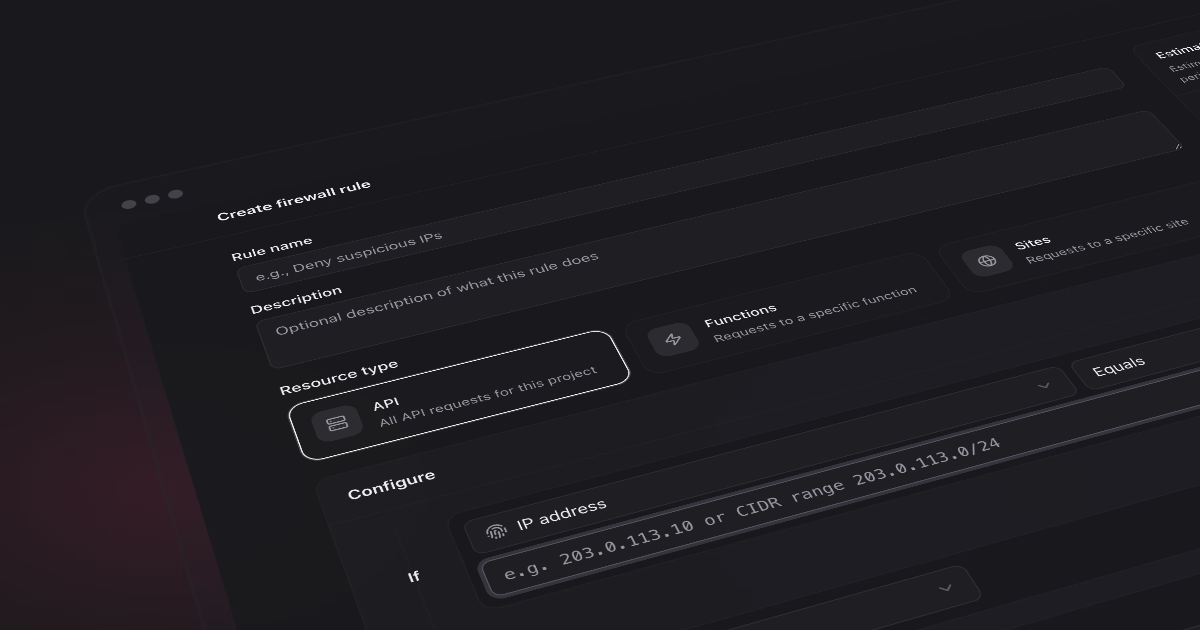
Quick orientation for those who haven't used it: Appwrite Firewall rules match requests to your project's API, Functions, or Sites based on conditions (IP, path, country, headers, and so on) and apply an action: deny, bypass, challenge, rate limit, or redirect. The IP condition takes single addresses like 203.0.113.10 or CIDR blocks like 10.0.0.0/8. So the CIDR block picks who the rule touches and the action picks what happens to them.
Blocking an abusive network
You're getting scripted abuse, and the requests come from 203.0.113.14, then 203.0.113.61, then 203.0.113.200. Blocking each one is whack-a-mole; whoever is behind it controls the whole range and will just rotate. What the addresses have in common is the first three octets, and that's a /24:
- Condition: IP address equals
203.0.113.0/24 - Action: Deny
One rule, 256 addresses, every match rejected with a 403 before it touches your application. If the abuse turns out to span 203.0.x.x, widen to 203.0.0.0/16 and you've covered 65,536 addresses instead. Just be aware of what widening costs: every step shorter on the prefix doubles the range, and past a certain point you're blocking bystanders who happen to share an ISP with your attacker.
Allowlisting your office network
Now the opposite problem. Your admin endpoints should only be reachable from the office, and your office has the 198.51.100.0/24 range. This takes two rules:
- Bypass rule at priority
-10: IP address equals198.51.100.0/24 - Deny rule at priority
10: path starts with/v1/admin
Appwrite Firewall evaluates rules in priority order, lowest number first, and stops at the first match. So a request from the office matches the bypass rule and sails through; everything after it is skipped. A request from anywhere else falls past the bypass and hits the deny.
This bypass-before-deny arrangement is the standard allowlist pattern, and CIDR is what makes it livable. Without it you'd be maintaining a list of individual employee IPs that goes stale every time DHCP reshuffles the office. With it, the rule is one line and it never changes.
Rate limiting everyone except your own infrastructure
Same pattern, different action. Your monitoring runs inside your VPC on 10.0.0.0/8 and hammers the API by design, so it shouldn't burn through rate limits meant for external clients:
- Bypass rule at priority
-10: IP address equals10.0.0.0/8 - Rate limit rule at priority
10: path starts with/v1, limited to 100 requests per 60 seconds
External traffic gets throttled per IP. Anything from inside the /8 skips the limiter entirely.
One Appwrite-specific detail to know: CIDR blocks only work with the equals and not equal operators. If you reach for "starts with" and enter 10., the firewall compares it as a plain string against the IP, which is not the range match you wanted. 10.0.0.0/8 with equals is the correct way to say "anything in ten-dot".
What about IPv6?
Everything above carries over to IPv6, just with 128 bits to play with instead of 32. A block looks like 2001:db8::/32, and the prefix length still counts fixed leading bits. The scale is hard to picture: an ISP might hand a single home customer a /64, which contains more addresses than the entire IPv4 internet, squared. But you read it the same way. Bigger prefix number, smaller range.
CIDR best practices
A few habits that pay off:
- Prefer one range over a pile of single IPs. A
/24rule is easier to audit than 256 entries, and easier to delete when it's no longer needed. - Use the narrowest prefix that does the job. Reaching for a
/16when the problem lives in a/24blocks 65,280 addresses that did nothing wrong. - Get comfortable with
/8,/16,/24, and/32. They land on byte boundaries, so you can read them without doing any math, and they cover most real situations. - Be suspicious of
0.0.0.0/0anywhere near an allow or bypass rule. As the target of a rate limit it's fine; as the source of an allowlist it's an open door. - Preview before enforcing. Appwrite Firewall estimates how many recent requests a rule would have matched while you're building it. If your "small" block would have matched half your traffic, better to learn that before enabling deny.
- Don't treat private ranges as inherently safe. Traffic from
10.0.0.0/8is only as trustworthy as whatever is running inside your network.
Conclusion
There isn't much more to CIDR than what's on this page. The slash number counts fixed bits, bigger means smaller, and a handful of prefixes cover almost everything you'll ever touch. It's one of those rare pieces of infrastructure knowledge that takes an afternoon to learn and then just quietly works for the rest of your career.
If you want it to stick, go use it once. Open your firewall, find a range in your logs, and write a rule against it. Reading about /24 is fine, but typing one into a deny rule and watching the match count is what actually makes it yours.
Start building
Appwrite Cloud gives developers a fully managed backend so you can ship fast without provisioning or maintaining any infrastructure. You get Auth, Databases, Storage, Functions, Sites, and Realtime out of the box, plus Firewall rules to control exactly which traffic reaches them, scaling automatically as your app grows. We post weekly roundups of product announcements, AI updates, and developer insights on the Appwrite blog and across our developer channels, so follow along wherever you read.
Whether you're prototyping your next idea or scaling a production app, Appwrite Cloud gives you a complete backend in one place, with no servers to manage and nothing to set up. Sign up for Appwrite Cloud and give your next build a real backend to grow on in minutes.