Build a financial analysis MCP server with Appwrite Functions_
Learn how to build a financial analysis MCP server with Appwrite Functions, TablesDB, and custom tools for statements, cash flow, and portfolio insights.

MCP is moving AI beyond isolated chat experiences. It gives models a standard, controlled way to work with the systems that run real products, from support platforms and internal operations to commerce and financial analysis. Instead of pasting data into a prompt, developers can expose focused tools that retrieve live information, enforce business rules, and return structured results.
We wanted to test that impact with a scenario where accuracy and controlled access matter. Using our new MCP server Function template, we developed a financial analysis MCP server that can summarize a portfolio, generate account statements, analyze spending, calculate monthly cash flow, and search transactions from an AI client.
We built the entire scenario on Appwrite. First, we used the Appwrite MCP server to create a connected financial data model and populate it with realistic dummy data. Then we deployed the MCP server template as an Appwrite Function and extended its example tools into a read-only reporting layer over that data.
How we built the financial analysis MCP server
The project uses two MCP servers with different responsibilities:
- Appwrite MCP server: Connects your AI coding agent to Appwrite so it can create the TablesDB schema and seed test data.
- Your financial analysis MCP server: Runs as an Appwrite Function and exposes only the reporting tools you define.
The second server never needs a long-lived Appwrite API key. Appwrite Functions receive a dynamic API key for each execution, and its permissions are limited by the Function scopes you select. This lets the AI client request useful reports without receiving unrestricted database access.
You will need an Appwrite Cloud account, an Appwrite project, a GitHub account, and an MCP-compatible client such as Claude Code, Cursor, or OpenAI Codex.
Test our financial analysis MCP server
You can try the completed server before building your own. Add this configuration to an MCP client that supports Streamable HTTP, such as Cursor or Claude Desktop:
{ "mcpServers": { "finance-mcp": { "url": "https://6a73369c003d9823a215.fra.appwrite.run/", "headers": { "Authorization": "Bearer test-string-123" } } }}The bearer token is intentionally public because this server contains only fictional demo data. Do not reuse the token for another deployment. Once connected, ask for a portfolio summary, generate a 30-day statement for acc-001, or compare spending and monthly cash flow for cust-001.
The complete implementation, Appwrite configuration, tool definitions, and additional test prompts are available in the GitHub repository.
Model a real financial scenario with the Appwrite MCP server
Before developing the reporting tools, we needed an Appwrite project that reflected the structure and edge cases of a real financial system. We connected the hosted Appwrite MCP server to our AI client so it could create and populate that backend through natural-language instructions.
Add the hosted Appwrite MCP server to your AI client:
{ "mcpServers": { "appwrite": { "type": "http", "url": "https://mcp.appwrite.io/" } }}When you connect for the first time, sign in with your Appwrite account and authorize the project you want to use. The hosted server uses OAuth, so you do not need to create an API key for this step.
We created a TablesDB database named FinDB with the ID findb. Its five tables model the reporting relationships we needed:
| Table | Important columns | Relationship |
|---|---|---|
customers | fullName, email, phone, dateOfBirth, kycStatus, country | One customer has many accounts |
accounts | accountNumber, accountType, balance, currency, accountStatus, openedDate | Belongs to a customer |
cards | cardNumberMasked, cardType, cardNetwork, expiryDate, cardStatus | Belongs to an account |
categories | name, categoryType, description | Groups transactions |
transactions | transactionType, amount, transactionDate, transactionStatus | Belongs to an account and category |
Ask your agent to create the schema with a prompt like this:
In my Appwrite project <PROJECT_ID>, create a TablesDB database named FinDBwith the ID findb and these tables:
- customers: fullName, email, phone, dateOfBirth, kycStatus, and country- accounts: accountNumber, accountType, balance, currency, accountStatus,  and openedDate- cards: cardNumberMasked, cardType, cardNetwork, expiryDate, and cardStatus- categories: name, categoryType, and description- transactions: transactionType, amount, transactionDate, and transactionStatus
Use the enum values verified|pending|rejected for KYC; checking|savings|creditfor account type; active|frozen|closed for account status; debit|credit for cardand transaction type; visa|mastercard|amex for card network;active|blocked|expired for card status; income|expense for category type;completed|pending|failed for transaction status; and USD|EUR|GBP for currency.
Add two-way one-to-many relationships from customers to accounts, accounts tocards, accounts to transactions, and categories to transactions. Add uniqueindexes for customer email, account number, and category name.
Before changing the project, show me the proposed schema. After I approve it,create the tables and verify that every relationship and index is available.
This lets the agent translate the model into API calls while giving you a review point before it changes the project.
Replicate a real situation with fictional data
We developed this fictional database specifically for the tutorial because a public demo should never expose real customer or transaction data. The scenario itself is not a toy model. Its customers, accounts, cards, categories, relationships, account states, transaction states, currencies, and reporting requirements replicate what a possible real-world financial application could contain.
We then asked the agent to populate the tables with synthetic but internally consistent records:
Seed FinDB with fictional financial data for reporting tests. Create customersacross several countries, one or two accounts per customer, a mix of checking,savings, and credit accounts, masked card numbers, income and expensecategories, and twelve months of transactions.
Keep every relationship valid. Include active, frozen, and closed accounts,and completed, pending, and failed transactions. Distribute account currenciesacross USD, EUR, and GBP. Never create real personal or payment-card data.Create and verify the data in manageable batches.
The resulting demo contains 30 customers, 47 accounts, 32 cards, 19 categories, and more than 5,000 transactions. You can start smaller. What matters is enough variation to test filters, date ranges, relationships, and aggregations in a realistic reporting workflow.
Set up the MCP server Function template
In the Appwrite Console, open Functions > Templates, search for MCP server, and create the Python Function. Connect it to a new GitHub repository so each push produces a deployment. The Function templates documentation explains the repository and production-branch options in the creation wizard.
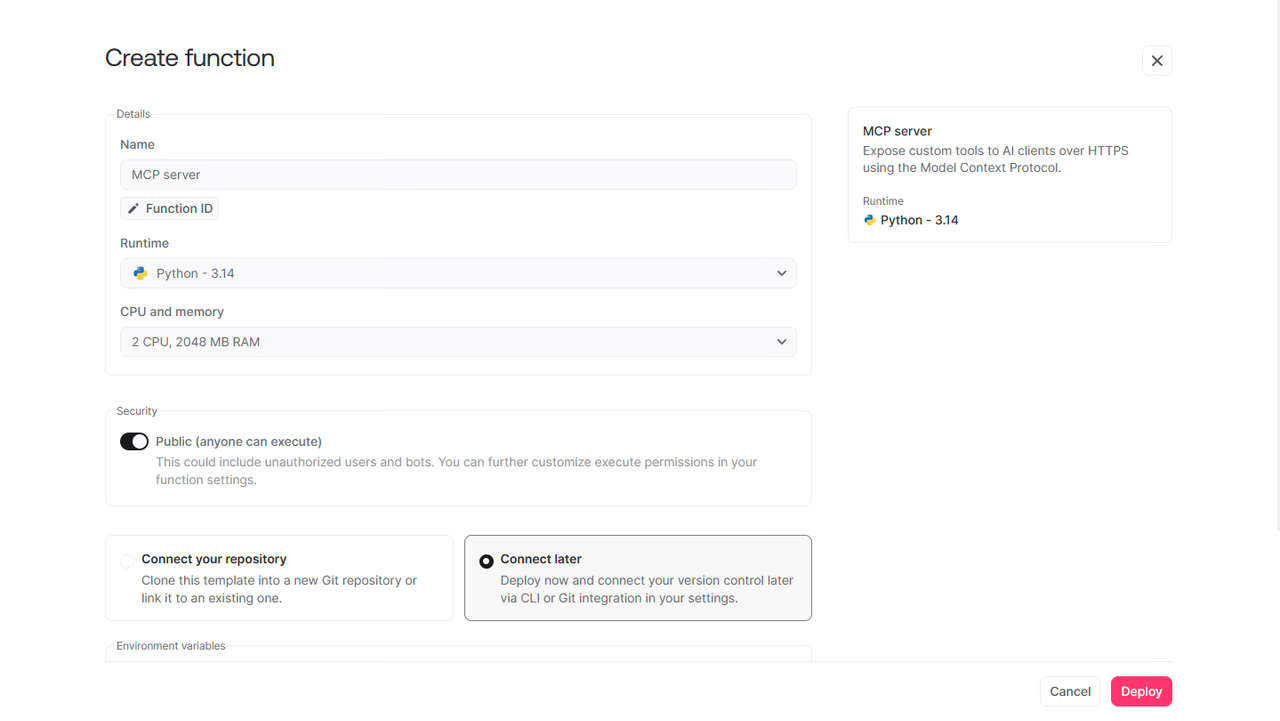
Configure the Function with these settings:
| Setting | Value |
|---|---|
| Runtime | Python 3.14 |
| Entrypoint | src/main.py |
| Build command | pip install -r requirements.txt |
| Timeout | 30 seconds |
| Execute permission | Any |
| Scopes | databases.read, tables.read, rows.read |
Set MCP_AUTH_MODE to bearer, add a long random value as MCP_AUTH_TOKEN, and set MCP_SERVER_NAME to finance-mcp. The HTTP endpoint is public at the Function layer because MCP clients call its domain directly, while the bearer token protects the MCP request itself.
Also set FINDB_DATABASE_ID=findb if you changed the default in the code. Keep MCP_TOOL_TIMEOUT at 25 seconds so a slow tool can return a clean error before the Function reaches its 30-second execution limit.
Extend the template with financial analysis tools
The template includes echo and add tools to prove the transport works. Replace them in src/app.py with a server configured for financial analysis:
import osfrom mcp.server.mcpserver import Context, MCPServer
DATABASE_ID = os.environ.get("FINDB_DATABASE_ID") or "findb"
server = MCPServer(    name=os.environ.get("MCP_SERVER_NAME") or "findb-reporting",    version="1.0.0",    instructions=(        "Read-only financial analysis over customers, accounts, cards, "        "categories, and transactions. Group totals by currency and never "        "convert currencies."    ),)
These instructions help the model choose and combine tools correctly, but each tool must still validate its own inputs.
Query TablesDB with the dynamic API key
Every tool needs a small request layer for the TablesDB REST API. Read the dynamic key from the MCP context and combine it with the endpoint and project ID supplied to the Function:
def appwrite_headers(ctx: Context) -> dict[str, str]:    api_key = (ctx.headers or {}).get("x-appwrite-key")    if not api_key:        raise ValueError("No dynamic Appwrite API key was provided")
    return {        "X-Appwrite-Project": os.environ["APPWRITE_FUNCTION_PROJECT_ID"],        "X-Appwrite-Key": api_key,        "Content-Type": "application/json",    }
The key can only use the read scopes configured on the Function. Even if a prompt asks a reporting tool to change a balance, Appwrite rejects the write because the Function has no row-write scope. See the Functions development guide for details on dynamic keys.
Define narrow tools with useful descriptions
MCP turns Python type hints into an input schema. A tool should describe the report it returns, its filters, accepted values, and important defaults:
@server.tool( description=( "List customers with basic profile fields. Filter by KYC status " "or country. Returns at most 100 entries." ))def list_customers( ctx: Context, kyc_status: str | None = None, country: str | None = None, limit: int = 25, offset: int = 0,) -> dict: limit = max(1, min(limit, 100)) # Build Appwrite queries, call TablesDB, and return selected fields.The finance MCP demo implements eight read-only tools:
| Tool | Report |
|---|---|
portfolio_summary | Counts, balances by currency and account type, transaction status, and date coverage |
list_customers | Customer profiles filtered by KYC status or country |
customer_overview | One customer's accounts, cards, balances, and recent activity |
account_statement | Transactions and totals for an account and date range |
spending_by_category | Completed debit spending or credit income grouped by category |
monthly_cash_flow | Monthly inflow, outflow, and net cash flow |
search_transactions | Transactions filtered by account, category, status, type, amount, or date |
list_accounts | Accounts filtered by customer, type, or status |
Use Appwrite queries to filter and select only the columns each report needs. For aggregations, page through matching rows and calculate totals inside the Function. Cap list results, validate date strings, and require either an account ID or customer ID when a report accepts both scopes.
Most importantly, do not add USD, EUR, and GBP into one number. The demo groups every balance and cash-flow total by currency. Without an exchange-rate source and a stated conversion time, a combined total would be misleading.
Deploy and connect the financial MCP server
Commit your changes and push them to the production branch. Appwrite builds and deploys the Function automatically. When the deployment is active, copy its generated domain and add it to your MCP client:
{ "mcpServers": { "finance-mcp": { "type": "http", "url": "https://<FUNCTION_ID>.<REGION>.appwrite.run/", "headers": { "Authorization": "Bearer <MCP_AUTH_TOKEN>" } } }}Restart or reconnect the client, then ask it to list the available tools. Test simple reports before trying a request that requires several tools:
Give me a portfolio summary with balances separated by currency.
Generate a 30-day statement for account acc-001.
Compare customer cust-001's balances, spending by category, and monthly cashflow. Keep currencies separate and state which tools you used.
The final prompt lets the client combine deterministic reports into a readable answer without receiving unrestricted access to TablesDB.
Harden financial analysis before using real data
This project uses fictional data, shared bearer authentication, and whole-dataset reporting. Treat it as a technical pattern, not a production banking system.
For real financial data, add identity-aware authorization so each caller can access only permitted customers and accounts. Minimize personally identifiable information in tool responses, keep audit logs, rotate secrets, and review the regulatory requirements for your application. You should also move large analytical workloads to a dedicated reporting pipeline instead of scanning thousands of operational rows during a synchronous Function request.
The design principle still holds: expose the smallest reporting capability an agent needs, enforce access in code and Appwrite scopes, and return structured evidence the client can explain.
Build your agentic apps with Appwrite
Build agentic apps on Appwrite Cloud with data, permissions, and Functions. Explore the Appwrite AI docs for implementation guides. Configure the backend with the Appwrite MCP server, then deploy the template with your agent's actions. Adapt the pattern to support, commerce, operations, and other workflows.