Announcing OAuth Device Authorization for the Appwrite CLI: Log in from your browser_
The Appwrite CLI now signs you in through your browser. Confirm a device code, review permissions, and authorize, without typing credentials into your terminal.

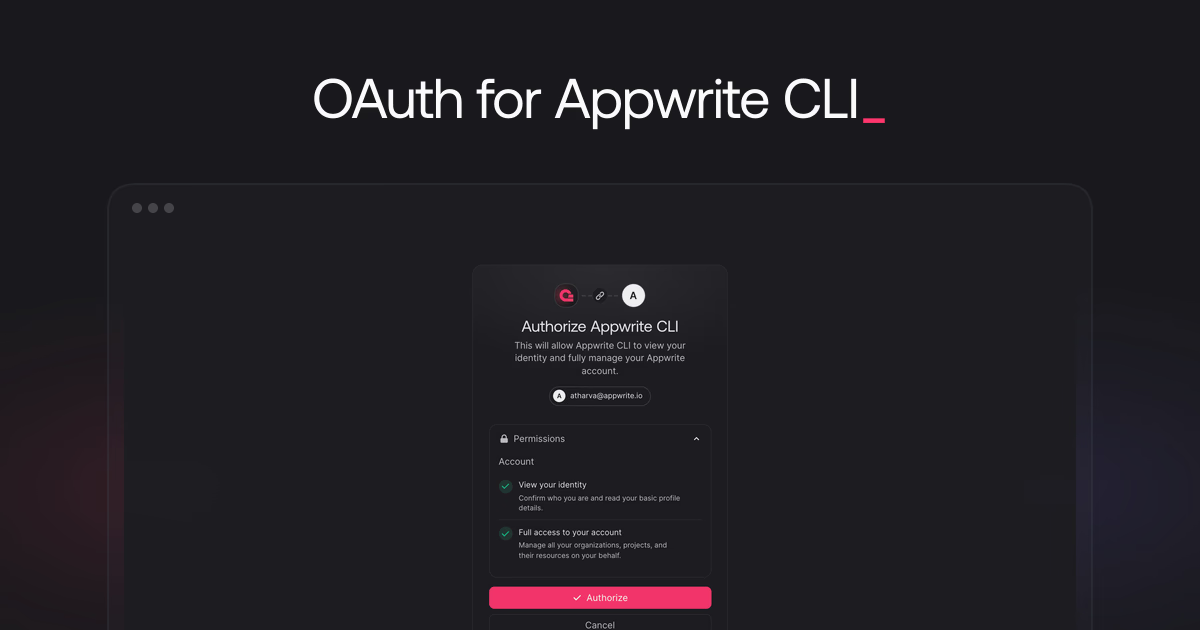
Signing in to a CLI should not mean typing your account password into a terminal prompt. Your identity already lives in your browser, and that is where authentication should happen.
Today, we are announcing OAuth Device Authorization for the Appwrite CLI. Running appwrite login now hands the sign-in process to your browser, so you can authenticate the CLI with the account session you already trust.
How it works
The new flow follows the OAuth 2.0 device authorization pattern. Run appwrite login, and the CLI displays a device code and a URL, then waits for approval.

Press Enter to open the URL, or copy it into any browser. Confirm the code on the page matches the one in your terminal and click Continue.

Review the permissions the CLI requests and click Authorize. Once approved, the CLI detects the authorization and finishes signing you in.

Consent you can see
Before the CLI can act on your behalf, the browser shows you exactly what access you are granting: viewing your identity and fully managing your Appwrite account.
Authorization is also reversible. You can revoke the CLI's access anytime from your Appwrite account settings.
Get started
Update the Appwrite CLI to the latest version and run:
appwrite loginThe CLI installation guide walks through every step with screenshots.
The CLI either needs an update or is pointed at a self-hosted Appwrite instance, which does not support the OAuth device authorization flow. Run appwrite update to get the latest version, or log in with the Appwrite Cloud endpoint explicitly:
appwrite login --endpoint="https://cloud.appwrite.io/v1"If a self-hosted endpoint persists, delete prefs.json from the CLI config directory. On macOS and Linux it lives at ~/.appwrite/prefs.json, on Windows at %USERPROFILE%\.appwrite\prefs.json.
API key based authentication is not affected by this change. Existing CLI sessions and non-interactive flows that authenticate with an API key through appwrite client will continue to work, and API keys remain the recommended way to authenticate the CLI in CI workflows. Learn more about non-interactive mode