Scopes_
The Sign in with Appwrite scope catalog, and how grants target the projects and organizations a user chooses.
4 min read
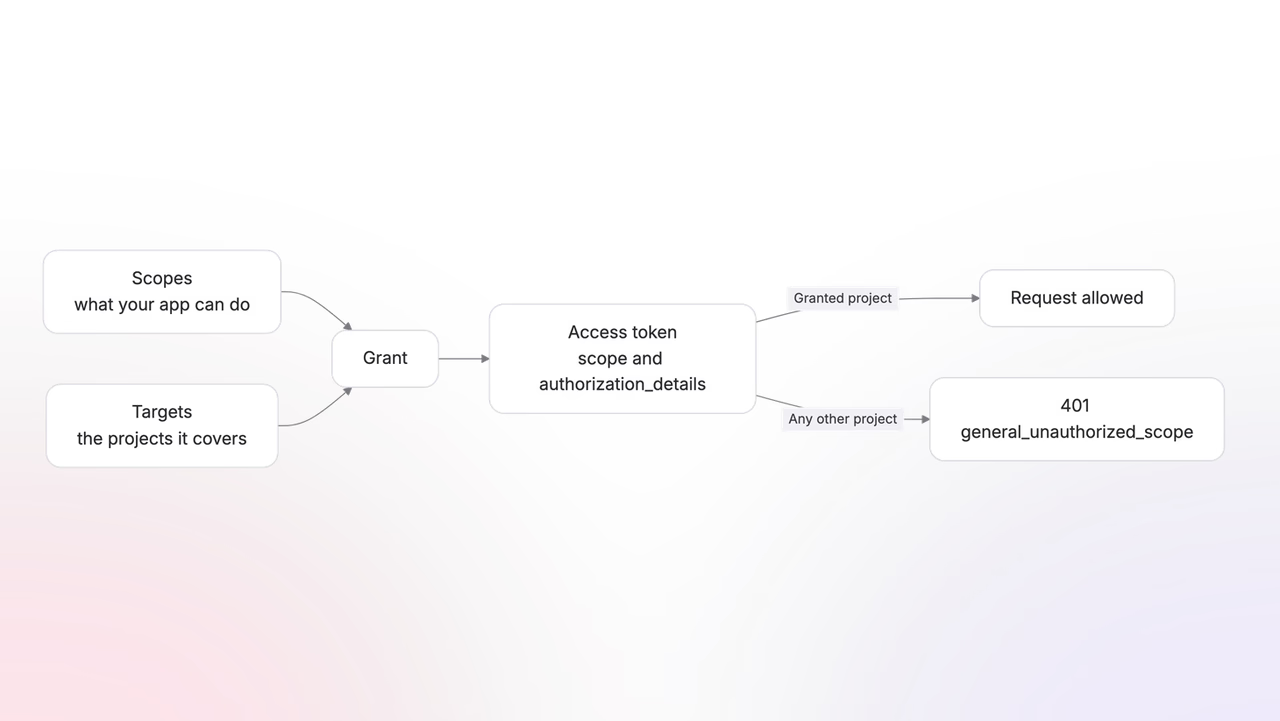
A scope names an action your app wants to perform. A grant pairs scopes with the projects and organizations they apply to. Both halves matter: project:databases.read by itself says what, and the user's project selection on the consent screen says where.
Request the smallest set that serves your app. Every scope you ask for appears on the consent screen as a permission line, and users decline requests that want too much.
Identity scopes
The OpenID Connect scopes cover who the user is. They are the same four scopes every OIDC provider uses.
| Scope | Grants |
|---|---|
openid | The user's subject identifier. Required to receive an ID token. |
profile | Profile claims, such as the user's name. |
email | The user's email address and its verification state. |
phone | The user's phone number and its verification state. |
An app that only signs users in requests openid profile email and stops there.
Project scopes
Project scopes carry the project: prefix and map to the permissions API keys use, one .read and one .write scope per resource. The catalog covers every Appwrite product:
| Product | Scopes |
|---|---|
| Databases | project:databases.read, project:databases.write, project:tables.read, project:tables.write, project:columns.read, project:columns.write, project:rows.read, project:rows.write, project:indexes.read, project:indexes.write |
| Auth | project:users.read, project:users.write, project:sessions.read, project:sessions.write, project:teams.read, project:teams.write |
| Storage | project:buckets.read, project:buckets.write, project:files.read, project:files.write, project:tokens.read, project:tokens.write |
| Functions | project:functions.read, project:functions.write, project:executions.read, project:executions.write |
| Sites | project:sites.read, project:sites.write, project:log.read, project:log.write |
| Messaging | project:providers.read, project:providers.write, project:topics.read, project:topics.write, project:subscribers.read, project:subscribers.write, project:targets.read, project:targets.write, project:messages.read, project:messages.write |
| Projects | project:project.read, project:project.write, project:keys.read, project:keys.write, project:platforms.read, project:platforms.write, project:webhooks.read, project:webhooks.write, project:policies.read, project:policies.write |
| Proxy | project:rules.read, project:rules.write |
| Domains | project:domains.read, project:domains.write |
| WAF | project:wafRules.read, project:wafRules.write |
| Usage | project:usage.read |
| Health | project:health.read |
| Migrations | project:migrations.read, project:migrations.write |
| Backups | project:backups.policies.read, project:backups.policies.write, project:archives.read, project:archives.write, project:restorations.read, project:restorations.write |
project:all grants the full project catalog at once. Reserve it for tools that genuinely administer whole projects; the consent screen presents it as full project access.
The full list is published in the discovery document under scopes_supported:
https://cloud.appwrite.io/v1/oauth2/console/.well-known/openid-configurationOrganization scopes
Organization scopes carry the organization: prefix and cover what a user's organization owns: its profile, members, projects, domains, and keys.
| Area | Scopes |
|---|---|
| Organization | organization:organization.read, organization:organization.write |
| Members | organization:organization.memberships.read, organization:organization.memberships.write |
| Projects | organization:projects.read, organization:projects.write |
| Domains | organization:domains.read, organization:domains.write |
| Keys | organization:organization.keys.read, organization:organization.keys.write |
organization:all grants the full set. organization:projects.write is the scope that creates projects, which lets an app provision on a user's behalf.
Targeting projects and organizations
Scopes say what your app can do. Targets say where. Every grant carries both.
When your request includes a project or organization scope, the consent screen asks the user which projects or organizations the scope applies to. You send only the scopes; the user's selection is written into the grant, and your app does nothing extra to make it happen.
Reading what was granted
The token response's authorization_details field holds the projects the user ended up granting.
To check a token you already hold, decode it. The access token is a JWT, and its payload carries the granted scopes and targets alongside the standard claims:
{ "iss": "https://cloud.appwrite.io/v1/oauth2/console", "sub": "6a150ace003bc4c2919e", "client_id": "horizon", "scope": "openid project:databases.read", "authorization_details": [{ "type": "project", "identifiers": ["*"] }], "exp": 1784832895}Neither value changes after issuance, so a decode is authoritative for what the token holds. Tokens covers verifying the signature.
To turn the targets into concrete projects, list them with the token itself:
Each project in the response carries its $id, region, and endpoint, which is everything your app needs to call it. The listing returns 25 projects per page and accepts limit and offset parameters; a matching /oauth2/console/organizations endpoint lists granted organizations the same way.
A scope only works inside its granted targets. A token with project:databases.read lists databases in the selected projects and returns 401 general_unauthorized_scope everywhere else.
When requests fail
A scope outside the catalog fails before the user ever sees a consent screen: the authorization endpoint redirects straight back to your app with error=invalid_scope. The catalog is published in the discovery document under scopes_supported, so your app can validate requests before sending them.
The user can also grant less than you asked by deselecting projects or organizations on the consent screen, so treat the token response's authorization_details as the truth, not your request. Consent shows what partial grants look like.
Was this page helpful?
Share what worked or what we should fix. Once approved, our agents automatically apply suggested updates to the docs.