Environment variables_
Set environment variables for your Appwrite Sites to pass constants and secrets at build and runtime.
3 min read
Appwrite Sites can read environment variables at build and runtime. Use them to pass constants and secrets such as API keys, connection strings, and feature flags without hardcoding them in your source.
A site reads from three sources, in this order of precedence:
- Project variables are shared across every function and site in your project. Set them once and every site inherits them automatically. See project variables for the full reference.
- Site variables are scoped to a single site. Override a project variable for one site by setting the same key on the site itself.
- Appwrite-injected variables are set by Appwrite at deployment time (for example,
APPWRITE_SITE_PROJECT_ID). These take final precedence and cannot be overridden.
Variable changes only take effect on the next deployment. Redeploy your site after creating, updating, or deleting variables.
Manage in the Console
- Navigate to your site in the Appwrite Console.
- Open the Settings tab > Environment variables section.
- Click Create variable and enter a key and value.
- Optionally select the Secret checkbox to prevent any team member from reading the value after creation.
- Click Create, then redeploy the site for the change to take effect.
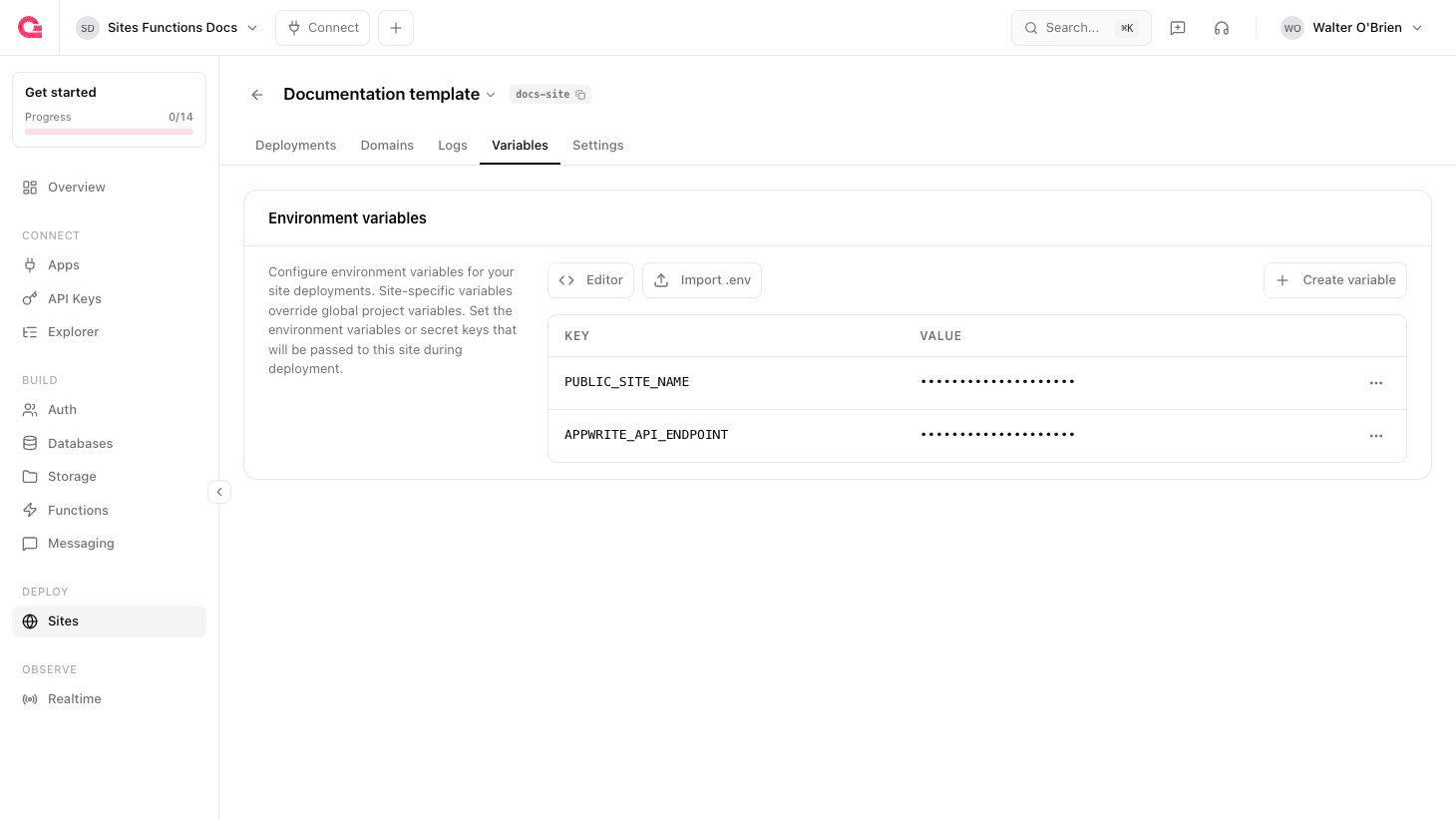
You can also configure global variables that apply to all your sites from your project's Settings page. See project variables for details.
Manage with a Server SDK
You can also manage site variables programmatically using a Server SDK. Each call requires an API key with the sites.write scope to create, update, or delete variables, or the sites.read scope to list and read them.
Create a variable
List variables
Get a variable
Update a variable
You can change a variable's key, value, or secret flag. Marking a variable as secret is one-way. Once set, the value is no longer readable from the Console or API.
Delete a variable
Read variables in your site
Read variables inside your site using your framework's standard environment lookup. For SSR sites, variables are read at runtime; for static sites, variables marked for build are inlined at build time.
For framework-specific guidance such as Next.js, SvelteKit, or Astro, see the framework adapters.
Appwrite-injected variables
Appwrite passes the following environment variables into every site deployment by default. They take precedence over your own variables, so do not set keys with the APPWRITE_ prefix.
| Variable | Description | Available at Build and/or Run Time |
|---|---|---|
APPWRITE_SITE_API_ENDPOINT | The API endpoint of the running site | Both |
APPWRITE_VERSION | The Appwrite version used to run the site | Both |
APPWRITE_REGION | The region where the site will run from | Both |
APPWRITE_DEPLOYMENT_TYPE | The deployment source type, such as manual, cli, or vcs | Both |
APPWRITE_SITE_API_KEY | The site API key used for server authentication | Build time |
APPWRITE_SITE_ID | The ID of the running site | Both |
APPWRITE_SITE_NAME | The name of the running site | Both |
APPWRITE_SITE_DEPLOYMENT | The deployment ID of the running site | Both |
APPWRITE_SITE_PROJECT_ID | The project ID of the running site | Both |
APPWRITE_SITE_RUNTIME_NAME | The runtime name of the running site | Both |
APPWRITE_SITE_RUNTIME_VERSION | The runtime version of the running site | Both |
APPWRITE_SITE_CPUS | The CPU (runtime) specification of the running site | Both |
APPWRITE_SITE_MEMORY | The memory (runtime) specification of the running site | Both |
APPWRITE_VCS_REPOSITORY_ID | The provider repository ID for VCS deployments | Both |
APPWRITE_VCS_REPOSITORY_NAME | The provider repository name for VCS deployments | Both |
APPWRITE_VCS_REPOSITORY_OWNER | The owner of the provider repository | Both |
APPWRITE_VCS_REPOSITORY_URL | The URL of the provider repository | Both |
APPWRITE_VCS_REPOSITORY_BRANCH | The branch used for the VCS deployment | Both |
APPWRITE_VCS_REPOSITORY_BRANCH_URL | The URL of the branch used for the VCS deployment | Both |
APPWRITE_VCS_COMMIT_HASH | The commit hash used for the VCS deployment | Both |
APPWRITE_VCS_COMMIT_MESSAGE | The commit message used for the VCS deployment | Both |
APPWRITE_VCS_COMMIT_URL | The URL of the commit used for the VCS deployment | Both |
APPWRITE_VCS_COMMIT_AUTHOR_NAME | The name of the VCS commit author | Both |
APPWRITE_VCS_COMMIT_AUTHOR_URL | The URL of the VCS commit author | Both |
APPWRITE_VCS_ROOT_DIRECTORY | The root directory configured for the VCS deployment | Both |
VCS metadata variables are populated for Git deployments. For manual and CLI deployments, VCS fields may be empty.
Secret variables
Mark a variable as Secret to hide its value from the Console and API after creation. Only the site runtime can read the value at build and runtime. Team members and external integrations cannot retrieve it after creation.
You can mark a variable as secret either when you create it or by updating an existing variable. Marking a variable as secret cannot be reversed. To replace a secret value, delete the variable and create a new one with the same key.
Limits
| Field | Limit |
|---|---|
| Variable ID | 36 characters, a-z A-Z 0-9 . - _ |
| Key | 255 characters |
| Value | 8192 characters |
Was this page helpful?
Share what worked or what we should fix. Once approved, our agents automatically apply suggested updates to the docs.